

Cloud Services
Microsoft Sharepoint Online & OneDrive for Business Hong Kong
Microsoft Sharepoint Online
Microsoft SharePoint Online is a cloud-based collaboration and document management platform that helps organizations share, organize, and manage content securely. It enables teams to create intranet sites, share files, and collaborate in real time—accessible from any device, anywhere. Integrated with Microsoft 365, SharePoint Online is the foundation for building a connected and productive workplace.

Key Feature of Microsoft Sharepoint Online Hong Kong
Team Sites & Intranet
Create secure team sites and company intranet portals for centralized communication and collaboration.
Document Management & Version Control
Store, organize, and manage files with automatic version history and easy recovery.
Real-Time Collaboration
Co-author documents with colleagues using Microsoft Office apps directly in the browser.
Advanced Search & Metadata
Quickly find documents and information with powerful search and tagging features.
Integration with Microsoft 365
Seamlessly works with Teams, OneDrive, and Office apps for a unified experience.
Security & Compliance
Built-in encryption, access controls, and compliance tools to meet industry standards like GDPR and HIPAA.
Workflow Automation
Automate business processes using Power Automate for approvals, notifications, and more.
Mobile Access
Access SharePoint sites and content from any device with the SharePoint mobile app.
Screenshot
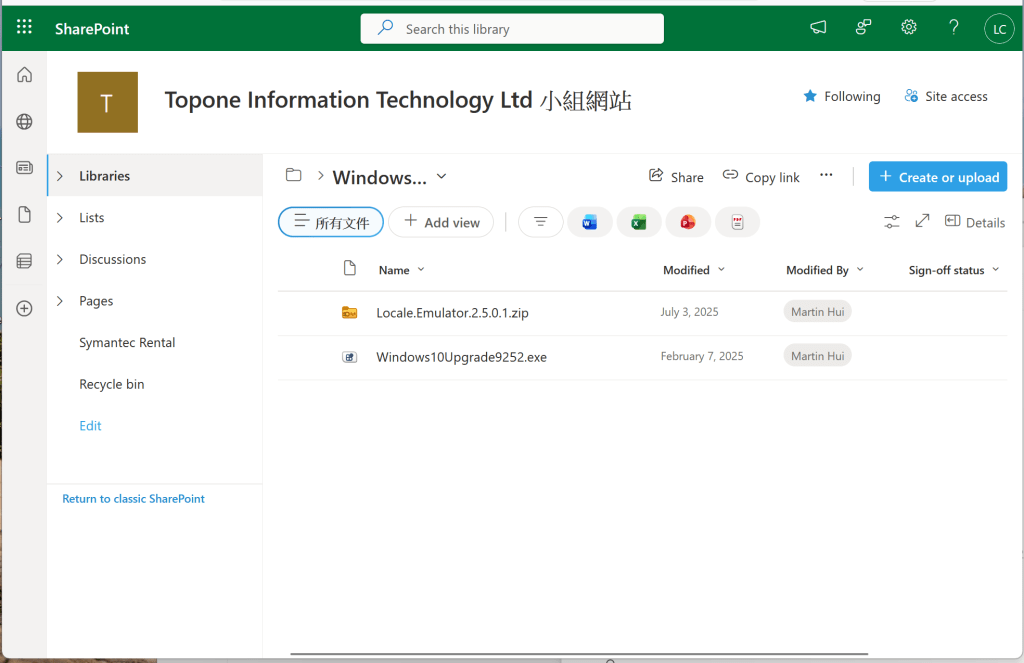
Microsoft OneDrive for Business Hong Kong
Microsoft OneDrive for Business Hong Kong is a secure cloud storage solution that allows users to store, access, and share files from any device, anywhere. It’s part of the Microsoft 365 suite and integrates seamlessly with Office apps, Teams, and SharePoint, making collaboration and file management simple and efficient. With OneDrive, your organization can ensure data is always available, backed up, and protected.
Key Features of Microsoft OneDrive for Business Hong Kong
Personal Cloud Storage
Each user gets dedicated storage space for files, documents, and media with easy access across devices.
Real-Time File Syncing
Automatically sync files between your PC and the cloud for up-to-date access everywhere.
Secure File Sharing
Share files internally or externally with granular permissions and expiration settings.
Version History & Recovery
Restore previous versions of files and recover deleted items easily.
Integration with Microsoft 365
Works seamlessly with Teams, SharePoint, and Office apps for a unified experience.
Advanced Security & Compliance
Built-in encryption, multi-factor authentication, and compliance with global standards like GDPR and HIPAA.
Mobile Access
Access and manage files from smartphones and tablets using the OneDrive app.
Offline Access
Work on files offline and sync changes automatically when you reconnect.
Screenshot

Real Client Result
Implemented centralized document management for a 30-user team, reducing file duplication and improving collaboration efficiency by over 50%.
Why Choose TopOne Microsoft Sharepoint Online & OneDrive for Business Hong Kong?
- Structured document management setup
- Secure access control and sharing policies
- Smooth migration from file servers
- Improved collaboration across teams
Who is this for?
Ideal for teams looking to centralize files, improve collaboration, and enable secure remote access.