

Cybersecurity Solutions
Secure Access Service Edge (SASE) Solutions in Hong Kong
Secure Your Workforce Anywhere with Cloud-Based Security
As businesses increasingly adopt cloud applications and hybrid working, traditional office-based firewalls can no longer provide complete protection. Employees now access company resources from home, client offices, airports, hotels, and mobile devices.
A Secure Access Service Edge (SASE) solution delivers enterprise-grade security directly from the cloud, ensuring users, devices, and applications remain protected no matter where they work.
At TopOne Information Technology, we deploy and manage SASE solutions to help businesses build a modern Zero Trust security architecture without the complexity of traditional VPN infrastructure.

What is SASE?
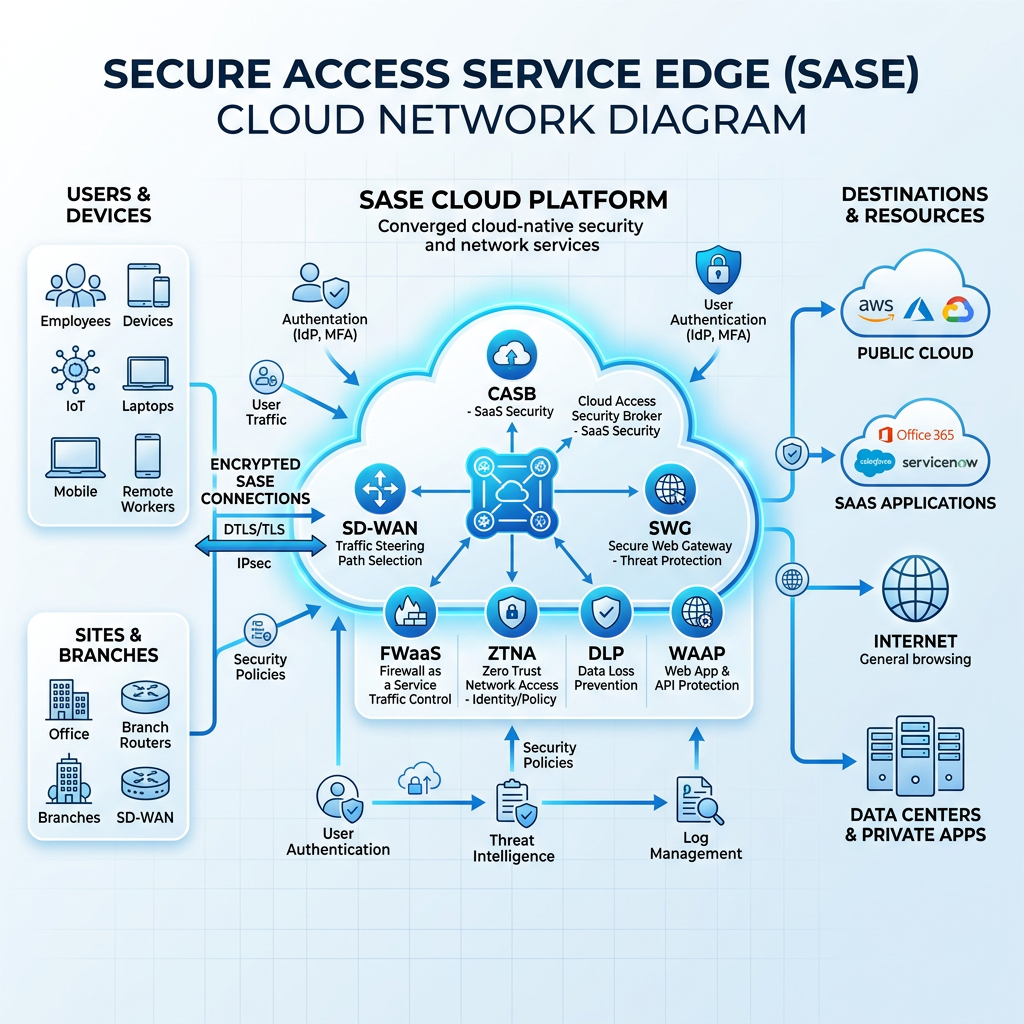
Secure Access Service Edge (SASE) is a cloud-native cybersecurity architecture that combines networking and security services into a single platform.
Instead of forcing users to connect through the office firewall before accessing cloud applications, SASE authenticates every user and device first, then securely connects them to the applications they are authorized to use.
Every connection is continuously verified based on:
- User identity
- Device health
- Location
- Security policies
- Risk level
This Zero Trust approach significantly reduces cyber risks while providing faster and more reliable access to business applications.
Why Traditional Security is No Longer Enough
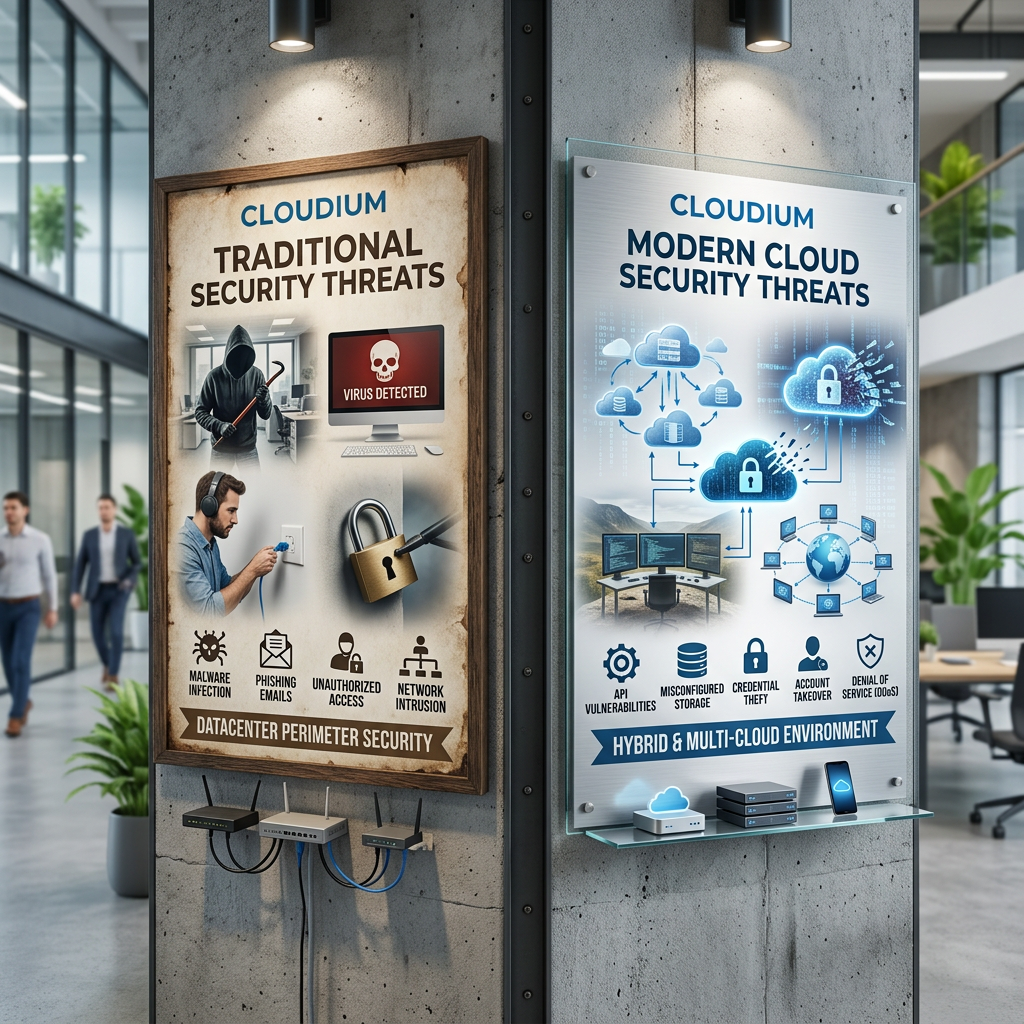
Traditional corporate networks were designed around the assumption that everyone worked inside the office.
Today, businesses rely on:
- Microsoft 365
- SharePoint Online
- OneDrive
- Teams
- Remote Desktop
- SaaS applications
- Hybrid work
- Mobile devices
- Multiple branch offices
Sending all traffic back through the office firewall creates:
- Slow VPN connections
- Poor Microsoft 365 performance
- Firewall bottlenecks
- Increased attack surface
- Complex firewall management
SASE moves security closer to users instead of forcing users to connect back to the office.
Key Features of our SASE Solution in Hong Kong
SSL/TLS Zero Trust Network Access (ZTNA)
Replace traditional VPN with secure application access.
Users only gain access to specific applications they are authorized to use instead of the entire corporate network.
Benefits include:
- No exposed VPN servers
- Continuous authentication
- Identity-based access
- Reduced ransomware risk
- Least privilege access
Secure Web Gateway (SWG)
Protect employees while browsing the Internet.
Every web request is inspected before reaching the destination.
Features include:
- Malware protection
- Phishing detection
- URL filtering
- DNS filtering
- HTTPS inspection
- Web category blocking
Prevent users from visiting malicious or inappropriate websites before attacks happen.
Cloud Firewall as a Service (FWaaS)
Enterprise firewall protection delivered from the cloud.
Instead of relying only on office firewalls, Cloud firewall applies security policies at its global network edge.
Capabilities include:
- Layer 3–7 traffic inspection
- IP filtering
- Port control
- Application awareness
- Threat intelligence
- Network segmentation
DNS Security
Block malicious domains before connections are established.
Protect users against:
- Command and Control servers
- Malware domains
- Phishing websites
- DNS tunneling
- Botnet communications
Data Loss Prevention (DLP)
Protect sensitive company information from accidental or intentional data leakage.
Cloudflare DLP can inspect data leaving your organization and identify confidential information such as:
- Hong Kong Identity Card (HKID) numbers
- Passport numbers
- Credit card information
- Bank account numbers
- Personal data
- Customer information
- Employee records
- Financial documents
- Intellectual property
- Confidential project files
Administrators can automatically:
- Block uploads
- Warn users
- Monitor sensitive activities
- Generate audit logs
- Apply different policies based on departments
This helps organizations comply with internal security policies and regulatory requirements while reducing the risk of data breaches.
Cloud Access Security Broker (CASB)
Gain visibility into cloud applications used across your organization.
Identify:
- Shadow IT
- Unapproved SaaS applications
- Risky file sharing
- Excessive permissions
- Cloud security misconfigurations
Improve governance across Microsoft 365 and other cloud platforms.
Browser Isolation
Open suspicious websites in an isolated cloud browser instead of the user’s computer.
Even if the website contains malware, ransomware, or exploit code, it cannot reach the endpoint.
Ideal for:
- High-risk users
- Finance departments
- Human Resources
- Customer service teams
- Contractors
Remote Browser Protection
Protect users when opening:
- Unknown websites
- Suspicious links
- Email attachments
- Newly registered domains
Reduce the chance of malware infecting company computers.
Identity-Based Access Control
Integrate with:
- Microsoft Entra ID
- Google Workspace
- Okta
- OneLogin
- Other SAML or OIDC identity providers
Enable policies based on:
- User groups
- Departments
- Geographic location
- Device compliance
- Multi-factor authentication (MFA)
Device Posture Checking
Ensure only trusted devices can access company resources.
Verify:
- Operating system version
- Antivirus status
- Disk encryption
- Device certificates
- Endpoint protection
- Patch compliance
Block unmanaged or non-compliant devices automatically.
Centralized Security Policies
Manage security for all users through a single cloud dashboard.
Apply policies consistently across:
- Office users
- Remote workers
- Branch offices
- Mobile devices
- Contractors
No additional hardware is required.
Global High-Speed Network
Operates one of the world’s largest global networks.
Benefits include:
- Faster Microsoft 365 access
- Low latency connections
- Reduced VPN congestion
- High availability
- Automatic failover
- Global performance optimization
Users connect to the nearest Cloudflare data center for optimal performance.
Benefits of SASE
Our managed SASE solution helps businesses:
- Protect remote and hybrid workers
- Eliminate traditional VPN complexity
- Secure Microsoft 365 and cloud applications
- Reduce ransomware risks
- Prevent phishing attacks
- Stop data leakage
- Improve Internet performance
- Simplify security management
- Enable Zero Trust security
- Support business compliance requirements
- Scale security without additional hardware
Why Choose TopOne
We provide end-to-end SASE deployment and management, including:
- Security assessment and planning
- SASE implementation
- Zero Trust policy design
- DLP policy configuration
- Microsoft Entra ID integration
- Multi-factor authentication setup
- User onboarding
- Security monitoring
- Ongoing management and support
- Regular security policy reviews
Our experienced engineers help businesses modernize cybersecurity while keeping deployment simple, secure, and cost-effective.