

Introduction
Over the years, TopOne has successfully delivered IT infrastructure, cloud, cybersecurity, digital transformation, and managed IT support projects for businesses across Hong Kong and the Asia-Pacific region. Our case studies demonstrate our practical experience, technical expertise, and commitment to helping clients achieve reliable, secure, and scalable IT environments.
Case Study 1
Multi-Asian Countries IT Infrastructure & Standardized PC Deployment
Background:
A UK-headquartered company was expanding its operations across Asia, with offices in Hong Kong, Japan, South Korea, Thailand, and Singapore. The client required a consistent IT infrastructure and standardized user environment across all locations while complying with the company’s global IT and cybersecurity policies.
The project involved coordinating hardware procurement, device configuration, cross-border deployment, and collaboration with local implementation partners to ensure every office was delivered to the same corporate standard.
Challenges:
The client faced several challenges during the regional rollout:
- Maintaining consistent IT standards across multiple countries.
- Procuring compatible hardware and ensuring quality before deployment.
- Delivering standardized Windows environments without unnecessary third-party software.
- Coordinating implementation across different time zones and local vendors.
- Minimizing disruption to employees during the office setup and migration process.
Solution:
Topone managed the Hong Kong deployment while working closely with trusted implementation partners in Japan, South Korea, Thailand, and Singapore to deliver a consistent IT environment across the region.
Our engineers first prepared all Hong Kong equipment in our integration center before delivery to the client’s office.
The project included:
- Procurement of enterprise firewalls, network switches, NAS storage, and business desktop computers.
- Complete firewall and network switch configuration based on the client’s corporate network design and security requirements.
- Fresh installation of Microsoft Windows using the official Microsoft installation media to ensure a clean operating system without manufacturer trial software or unnecessary third-party applications.
- Microsoft Autopilot deployment to automatically configure corporate policies, security settings, applications, and user profiles.
- Hardware testing and quality assurance before delivery.
- Delivery, onsite installation, user workstation setup, printer connectivity, and final user acceptance testing at the Hong Kong office.
- Close collaboration with implementation partners in Japan, South Korea, Thailand, and Singapore, sharing deployment procedures, configuration standards, and project documentation to ensure a consistent rollout across every office.
Result:
The client successfully established a standardized and secure IT environment across all Asian offices. Every location followed the same deployment standards, enabling the UK headquarters to manage devices more efficiently while improving security, reducing deployment time, and simplifying ongoing IT support.
Business Benefits:
- Standardized IT infrastructure across five Asian countries.
- Consistent Windows configuration using Microsoft Autopilot.
- Improved cybersecurity through clean operating system deployment and centralized security policies.
- Faster employee onboarding with pre-configured devices ready for immediate use.
- Reduced operational risks through standardized deployment procedures.
- Simplified remote management and ongoing IT support for regional offices.
- Successful collaboration between TopOne and overseas implementation partners, ensuring a smooth multi-country deployment with minimal disruption to business operations.

Case Study 2
Secure Datacenter Backup, Disaster Recovery & Private Cloud Solution in Hong Kong
Background:
Many businesses rely on servers and critical business systems that are vulnerable to hardware failure, ransomware attacks, natural disasters, or unexpected office incidents. Traditional onsite backups alone cannot provide sufficient protection, as backup devices are often located in the same office as the production systems.
To improve business continuity and strengthen disaster recovery capabilities, Topone designed and implemented secure offsite backup and private cloud solutions hosted in a professional datacenter environment.
Challenges:
The client required a disaster recovery solution that could:
- Protect critical business data outside the office.
- Minimize downtime in the event of server failure or ransomware attacks.
- Provide secure remote access to backup systems and replicated virtual machines.
- Improve infrastructure reliability without maintaining additional server equipment in the office.
- Meet business continuity and disaster recovery requirements while keeping ongoing management simple.
Solution:
Topone provides secure datacenter services from professionally managed facilities equipped with redundant power supplies, high-speed Internet connectivity, environmental monitoring, and 24×7 physical security.
Our engineers designed and implemented a complete disaster recovery solution that included:
- Rack space and infrastructure hosting within a professional datacenter.
- Deployment of client-owned equipment or provision of enterprise servers supplied and managed by Topone.
- Veeam Backup & Replication to perform scheduled offsite backups and virtual machine replication.
- Site-to-site IPsec VPN or dedicated leased line connectivity between the client’s office and the datacenter to ensure secure and reliable data transmission.
- Disaster recovery virtual machines replicated to the datacenter, allowing critical systems to be restored quickly when required.
- Secure remote access through IPsec Client VPN with individual user accounts, or access restricted by approved public IP addresses for enhanced security.
- Ongoing monitoring, maintenance, and disaster recovery planning to ensure backup integrity and business continuity.
Results:
The client established a secure offsite disaster recovery environment capable of protecting critical business systems and data while reducing the risks associated with maintaining all infrastructure in a single office location. By leveraging the reliability and performance of the datacenter network, the client also benefited from improved remote access performance and simplified IT infrastructure management.
Business Benefits:
- Secure offsite backup and disaster recovery environment.
- Improved protection against hardware failure, ransomware, and office incidents.
- Rapid recovery of business-critical virtual machines using Veeam Backup & Replication.
- Secure connectivity through site-to-site VPN or dedicated leased line.
- Enhanced remote access performance using the datacenter’s high-speed and highly available network.
- Reduced reliance on ageing office server cabinets and onsite infrastructure.
- Improved business continuity with professionally managed datacenter facilities and tested disaster recovery capabilities.

Case Study 3
Smart Door Access & IP CCTV Security Solution in Hong Kong
Background:
As businesses expand or relocate to new offices, protecting employees, visitors, and valuable company assets becomes increasingly important. A reliable door access control and CCTV surveillance system not only strengthens physical security but also helps organizations manage employee attendance, monitor premises, and respond quickly to security incidents.
Topone has successfully implemented integrated Door Access and IP CCTV solutions for offices, warehouses, retail stores, and commercial premises across Hong Kong.
Challenges:
The client required a security solution that could:
- Prevent unauthorized access to office premises.
- Monitor entrances, common areas, and critical locations with high-quality video surveillance.
- Support different authentication methods based on business requirements.
- Integrate attendance tracking with daily operations.
- Ensure reliable system performance with ongoing maintenance and technical support.
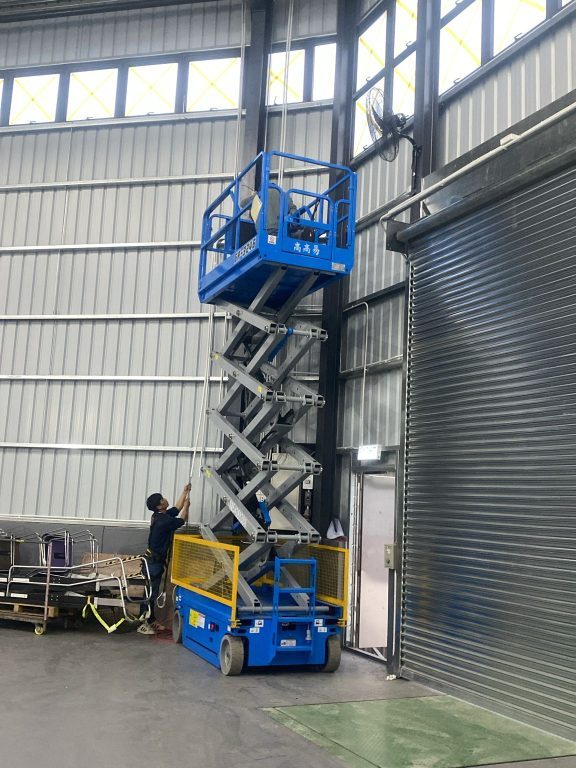
- Coordinate installation with office renovation and fit-out schedules.
Solution:
Topone worked closely with the client from the initial planning stage to design a security solution that matched the office layout, operational requirements, and future expansion plans.
Our solution included:
- Site survey and security planning to determine the optimal locations for door access controllers and CCTV cameras.
- Collaboration with the client’s interior design and renovation contractors to coordinate network and power cabling during office construction, ensuring a clean and efficient installation.
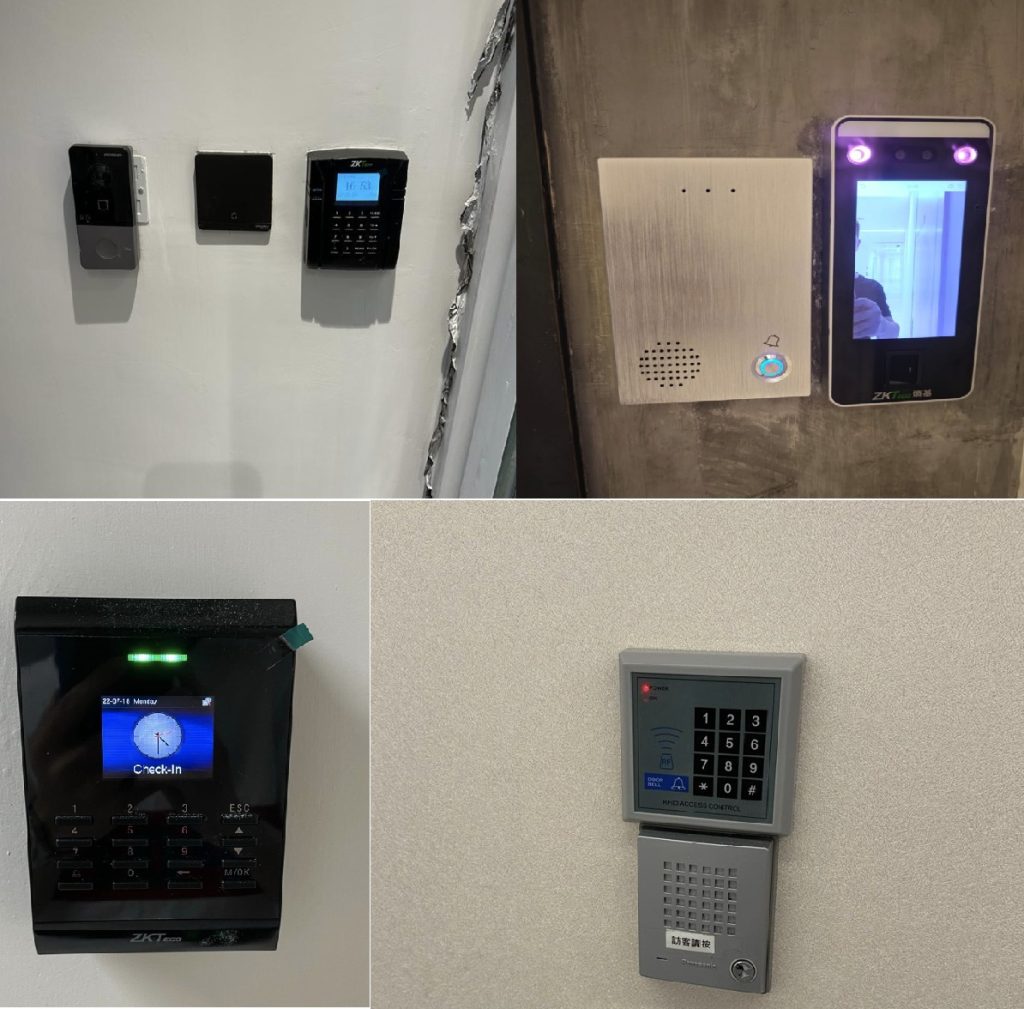
- Supply and installation of intelligent door access systems supporting multiple authentication methods, including facial recognition, fingerprint verification, RFID access cards, PIN passwords, or a combination of these technologies.
- Integration of the door access system with attendance management, enabling employee check-in/check-out records and attendance reporting.Deployment of enterprise-grade IP CCTV cameras with centralized Network Video Recorder (NVR) or Digital Video Recorder (DVR) storage for continuous video recording and playback.
- Secure remote monitoring and administration, allowing authorized personnel to access live and recorded footage from anywhere through encrypted remote connections.
- Comprehensive system testing, user training, and ongoing maintenance services to ensure long-term system reliability.
Following project completion, the client enrolled in Topone’s maintenance service, which includes regular remote health checks of CCTV recording systems, verification of camera status, troubleshooting of door access and attendance systems, onsite repair when required, and proactive replacement recommendations for components such as surveillance hard drives nearing the end of their service life.
Results:
The client successfully implemented a fully integrated physical security solution that strengthened access control, improved workplace safety, and simplified security management. Through proactive maintenance and monitoring, the systems continue to operate reliably, giving the client confidence that their facilities remain protected at all times.
Business Benefits:
- Enhanced physical security for offices, warehouses, and retail premises.
- Flexible authentication options including facial recognition, fingerprint, RFID card, and PIN access.
- Integrated attendance management with automated reporting.
- High-definition CCTV surveillance with centralized recording and secure remote monitoring.
- Well-planned cabling and infrastructure coordinated with office renovation projects.
- Proactive maintenance and health monitoring to maximize system reliability.
- Reduced downtime through responsive technical support and preventative maintenance.
- A scalable security platform that can grow alongside the client’s business.

Case Study 4
Professional IT Office Relocation & Server Infrastructure Migration in Hong Kong
Background:
When businesses relocate to a new office, moving IT infrastructure is often one of the most critical and high-risk tasks. Servers, firewalls, switches, storage devices, and network equipment must be disconnected, transported, and recommissioned correctly to avoid unnecessary business disruption.
Topone specializes in professional IT office relocation services, helping clients migrate their server room and network infrastructure safely while minimizing system downtime and ensuring business continuity.
Challenges:
The client was relocating to a new office and required a carefully planned IT migration that could:
- Minimize disruption to daily business operations.
- Safely relocate mission-critical servers and network equipment.
- Ensure all network services were restored quickly at the new office.
- Reduce the risks of equipment damage during transportation.
- Complete the migration within a limited project schedule.
While workstation relocation was optional, the client’s primary concern was the safe migration of the server room and network infrastructure.
Solution:
Before the relocation, our engineers conducted a detailed assessment of the existing IT environment and prepared a structured migration plan.
The project included:
- Comprehensive documentation and labelling of all power cables, network cables, fibre connections, and equipment ports before dismantling.
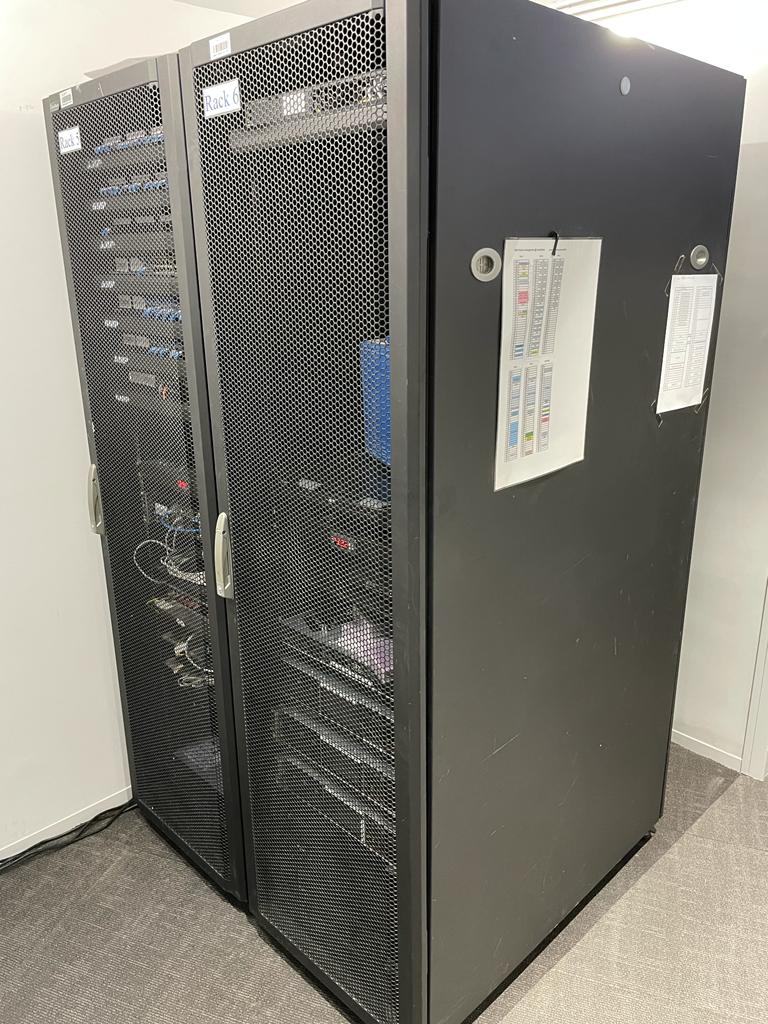
- Careful shutdown and removal of servers, firewalls, switches, NAS storage, UPS units, and other rack-mounted equipment.
- Individual packing and labelling of network and power cables to simplify reinstallation.
- Professional packaging of fragile IT equipment to reduce transportation risks.
- Coordination with either the client’s appointed relocation company or Topone’s professional IT relocation partner.
- Transportation of server equipment using dedicated equipment trolleys and protective packing designed specifically for sensitive IT infrastructure.
- Reinstallation of servers and network equipment into the new server rack according to the original network design.
- Reconnection of Internet services, firewall, switches, wireless network, storage devices, and business servers.
- Comprehensive testing to verify network connectivity, server availability, Internet access, shared resources, and critical business applications before users returned to work.
For desktop computers, many clients preferred to pack and transport their own workstations. Once employees arrived at the new office, they simply connected their PCs to the preconfigured network infrastructure and resumed normal operations.
Results:
The client’s IT infrastructure was successfully relocated and restored within the planned migration window. By prioritizing the server room and core network infrastructure, Internet connectivity, file servers, and business systems were available immediately after the office relocation, allowing employees to return to work with minimal interruption.
Business Benefits:
- Well-planned server and network infrastructure migration with minimal business downtime.
- Safe transportation of critical IT equipment using professional handling procedures.
- Faster restoration of Internet, servers, and business applications after relocation.
- Reduced risk of equipment damage through proper packaging and transportation.
- Simplified workstation setup for employees at the new office.
- Professional project management and coordination with relocation contractors.
- A structured and scalable IT environment ready to support future business growth.
Case Study 5
Managed Network Device Leasing Solution in Hong Kong
Background:
Many small and medium-sized businesses require reliable enterprise-grade network infrastructure but prefer to avoid the significant upfront investment associated with purchasing IT equipment. In addition to the hardware itself, businesses also need ongoing maintenance, firmware updates, technical support, and rapid hardware replacement to ensure uninterrupted network operations.
Topone provides a fully managed network device leasing solution that combines enterprise hardware, professional configuration, proactive monitoring, and ongoing technical support under a predictable monthly subscription.
Challenges:
The client required a network solution that could:
- Eliminate large capital expenditure on network infrastructure.
- Provide secure and stable Internet connectivity for daily business operations.
- Reduce the burden of maintaining firewalls, switches, and wireless networks.
- Ensure rapid replacement of failed equipment to minimize business disruption.
- Scale easily as the business grows or opens additional offices.
Solution:
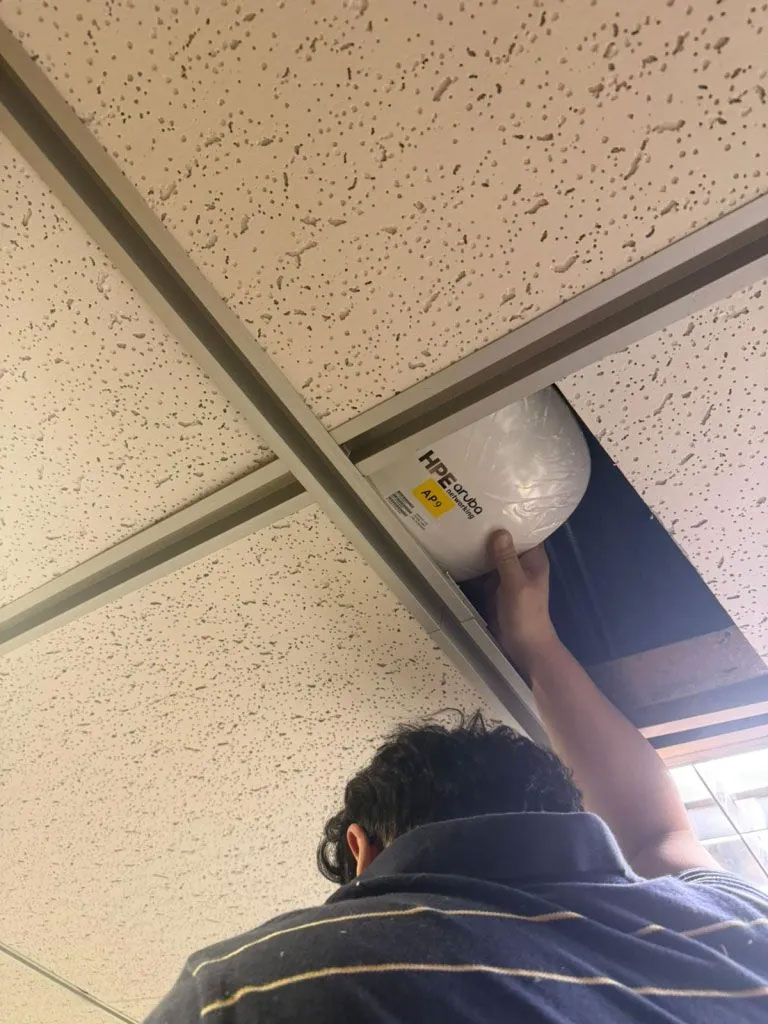
Topone supplied a complete managed network solution using enterprise-grade hardware, including FortiGate firewalls, H3C managed switches, and HP Aruba wireless access points.
Our engineers delivered the project from initial deployment through ongoing lifecycle management, including:
- Supply and leasing of enterprise network equipment under a flexible monthly service plan.
- Professional configuration of firewalls, managed switches, and wireless access points using Topone’s proven deployment standards and security best practices.
- Optimisation of firewall security policies, wireless coverage, and network performance based on practical experience from numerous client environments.
- Continuous monitoring of firewall health, security events, and system status to identify potential issues and recommend configuration improvements when required.
- Regular firmware management and maintenance to improve stability, security, and performance.
- Preventive maintenance and technical support provided under a Service Level Agreement (SLA).
- Immediate hardware replacement using spare FortiGate firewalls, H3C switches, and Aruba access points maintained by Topone, significantly reducing service interruption in the event of hardware failure.
Results:
The client successfully deployed a secure, reliable, and professionally managed network infrastructure without making a significant upfront investment. Through proactive monitoring, regular maintenance, and rapid hardware replacement services, the client’s network continues to operate reliably while allowing internal staff to focus on their core business.
Business Benefits:
- Enterprise-grade network infrastructure without high capital investment.
- Predictable monthly operating costs through a flexible leasing model.
- Professionally configured firewall, switching, and wireless network.
- Improved network reliability through proactive monitoring and regular maintenance.
- Enhanced cybersecurity with ongoing firewall policy review and firmware updates.
- Rapid hardware replacement using locally stocked spare equipment.
- Scalable infrastructure that can easily support future business growth and office expansion.
- A fully managed networking solution backed by experienced IT engineers and responsive technical support.

Case Study 6
Enterprise Video Conferencing Solution in Hong Kong
Background:
As hybrid working and remote collaboration became increasingly important, many businesses required reliable and easy-to-use meeting room solutions that could support Microsoft Teams and Zoom across multiple office locations. Existing meeting rooms often suffered from inconsistent equipment, unstable network performance, poor audio quality, and frequent video call interruptions, leading to reduced productivity and inefficient collaboration.
Topone designed and deployed standardized enterprise video conferencing solutions that provide a consistent meeting experience while simplifying future expansion and ongoing management.
Challenges:
The client required a video conferencing solution that could:
- Deliver high-quality Microsoft Teams and Zoom meetings across multiple offices.
- Eliminate video freezing, poor audio quality, and dropped calls caused by network limitations.
- Standardize meeting room equipment for easier user adoption and IT support.
- Support both dedicated meeting room systems and Bring Your Own Device (BYOD) scenarios.
- Provide a scalable design suitable for future office expansion.
Solution:
Topone designed and implemented a complete enterprise video conferencing solution covering meeting room hardware, network optimisation, and standardized room design.
End-to-End Video Conferencing Deployment
Our engineers supplied and configured enterprise-grade meeting room equipment, including:
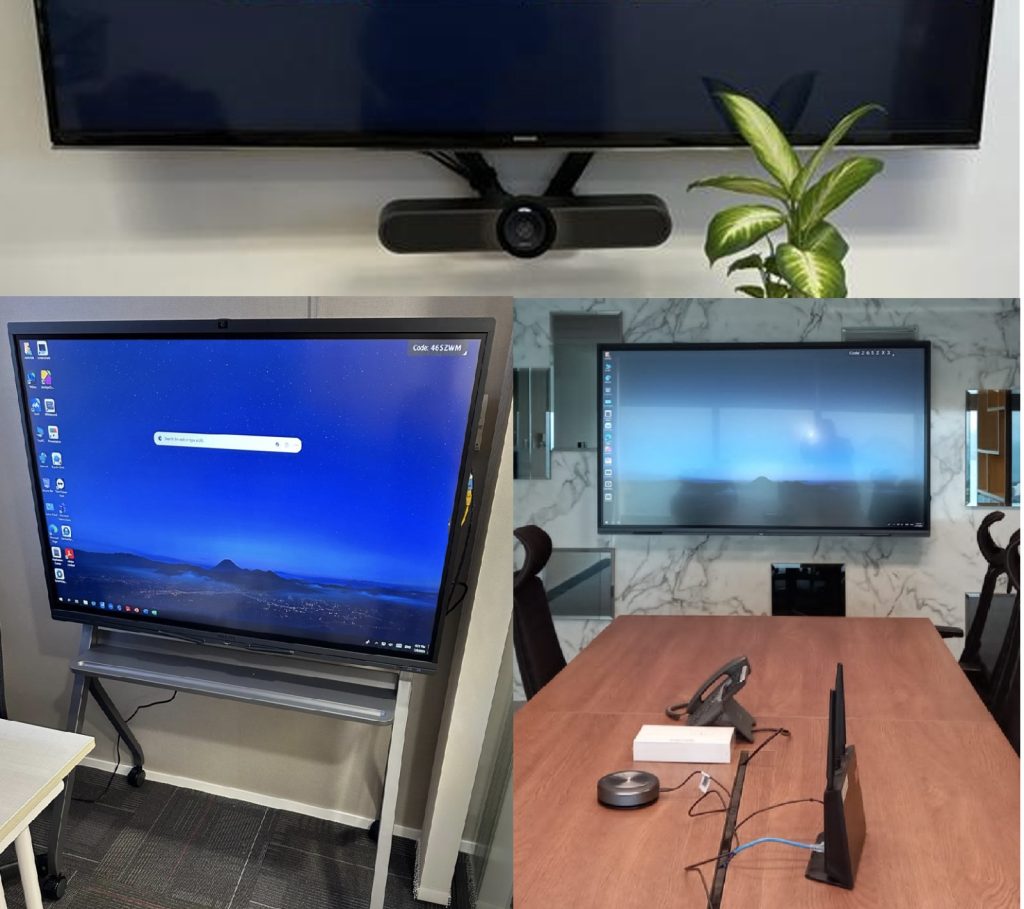
- Logitech video conferencing systems.
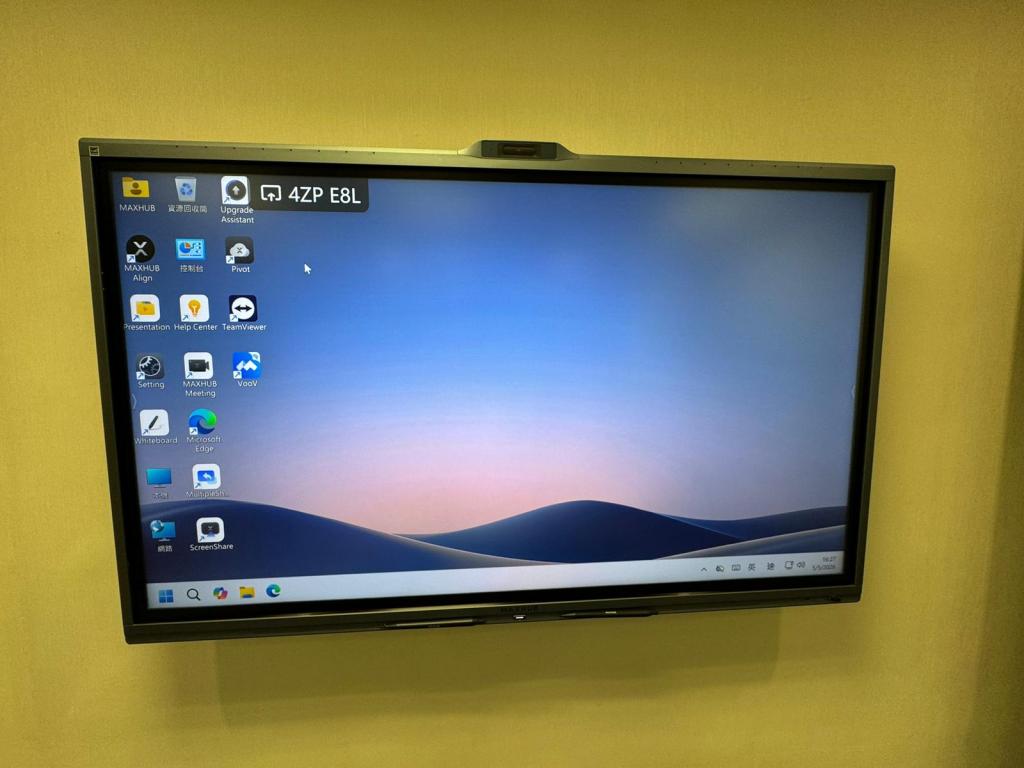
- MAXHUB interactive displays.
- Microsoft Teams Rooms and Zoom Rooms native meeting environments.
Each meeting room was professionally configured, tested, and optimised to provide a simple one-touch meeting experience.
Network & Firewall Optimisation
To ensure stable real-time communication, our engineers optimised the client’s network infrastructure by:
- Configuring firewall policies to allow Microsoft Teams and Zoom media traffic.
- Prioritising voice and video traffic using Quality of Service (QoS).
- Reducing latency, packet loss, and network jitter that commonly affect online meetings.
Standardised Meeting Room Design
To simplify deployment and future expansion, Topone developed three standard meeting room configurations based on room size and business requirements.
Tier 1 – Small Meeting Rooms (Huddle Spaces)
Designed for small collaboration spaces using Logitech Rally Bar Huddle, Logitech Tap Controller, Microsoft Teams Rooms, and Biamp USB switching to support both dedicated room meetings and BYOD connectivity.
Tier 2 – Medium Meeting Rooms
Designed around Logitech Rally Bar Mini with Logitech Tap Controller, Microsoft Teams Rooms, Rally Mic Pod, and Biamp USB switching to provide improved audio coverage and seamless user experience.
Tier 3 – Large Meeting Rooms
Designed using Logitech Rally Bar, Logitech Tap Controller, Microsoft Teams Rooms, dual Rally Mic Pods, and Biamp USB switching to deliver enterprise-grade audio and video coverage for larger conference rooms.
Results:
The client successfully deployed a standardized enterprise video conferencing environment across multiple office locations. Employees can now start Microsoft Teams and Zoom meetings with a single touch while enjoying consistent high-definition audio and video quality. The standardized design also simplifies future room deployments and ongoing technical support.
Business Benefits:
- High-quality Microsoft Teams and Zoom meeting experience across all offices.
- Standardized meeting room design for simplified deployment and support.
- One-touch meeting experience with minimal user training.
- Improved audio and video quality through network and firewall optimisation.
- Flexible support for both dedicated meeting rooms and BYOD scenarios.
- Reduced meeting interruptions caused by network latency and firewall restrictions.
- Scalable meeting room standards for future office expansion.
- Enhanced collaboration between local and overseas teams through reliable video conferencing technology.
Case Study 7
Exchange Server 2010 to Microsoft 365 Email Migration (120 Mailboxes) in Hong Kong
Context & Challenges:
A client operating an on-premises Microsoft Exchange Server 2010 environment required a migration to Microsoft 365 to modernize its email infrastructure, improve reliability, and reduce the operational overhead of maintaining an aging mail server.
The organization had approximately 120 active mailboxes, and email continuity was critical to daily business operations. The client required a migration approach that would minimize downtime, prevent email loss, and ensure a smooth transition for all users.
Challenge:
- Migrate 120 user mailboxes from Exchange Server 2010 to Microsoft 365 with minimal disruption.
- Ensure no email data loss during the migration process.
- Minimize business downtime during the cutover period.
- Synchronize all newly received emails during the transition period.
- Complete the migration with minimal impact on end users and business operations.
Solution:
Topone designed and implemented a staged migration approach to ensure a seamless transition.
Project Implementation:
- Provisioned and configured all user mailboxes in Microsoft 365 before the migration project commenced.
- Performed pre-migration assessment and verified mailbox health, storage usage, and DNS configurations.
- Utilized MigrationWiz to perform mailbox migration from Exchange Server 2010 to Microsoft 365.
- Conducted an initial background migration over approximately one week, allowing the majority of mailbox data to be migrated while users continued to work normally on the existing Exchange environment.
- Scheduled a mutually agreed cutover window with the client to minimize business impact.
- During the cutover phase, executed a final synchronization to migrate all outstanding emails, calendar items, contacts, and newly received messages.
- Updated DNS records, including MX and Autodiscover records, to redirect email services to Microsoft 365.
- Reconfigured Outlook profiles and validated email functionality for all users after migration completion.
Result:
The migration project was completed successfully with minimal downtime.
- Successfully migrated all 120 mailboxes to Microsoft 365.
- No email data was lost throughout the migration process.
- All outstanding and newly received emails were successfully synchronized during the final migration stage.
- Email services resumed smoothly following DNS cutover.
- End users experienced minimal disruption during the transition.
Impact & Benefits:
- Improved email reliability and availability through Microsoft 365 cloud services.
- Eliminated the need to maintain aging on-premises Exchange Server infrastructure.
- Reduced hardware maintenance and operational costs.
- Enhanced business continuity and disaster recovery capabilities.
- Provided users with secure access to email, calendar, and collaboration services from anywhere.
- Enabled the client to leverage Microsoft 365’s modern security and productivity features.
This successful migration demonstrates Topone’s capability in delivering large-scale email migration projects while ensuring business continuity and zero email loss.
Case Study 8
Digital Transformation – OCR Document Scanning & EDMS Solution in Hong Kong
Context & Challenges:
A large traditional enterprise in Hong Kong had accumulated a significant volume of engineering drawings, floor plans, technical designs, and historical documents over many years. Most of these documents were stored in physical files and cabinets, occupying valuable office space and making document retrieval time-consuming.
The client wanted to relocate the physical archives to an offsite storage facility while ensuring employees could quickly access and search historical documents whenever needed.
Challenge:
- Manage and digitize a large volume of historical engineering documents and drawings.
- Reduce the need for physical document storage within the office.
- Enable employees to quickly search and retrieve archived documents.
- Preserve historical records in high quality for long-term retention.
- Improve accessibility for staff working in different locations and on mobile devices.
Solution:
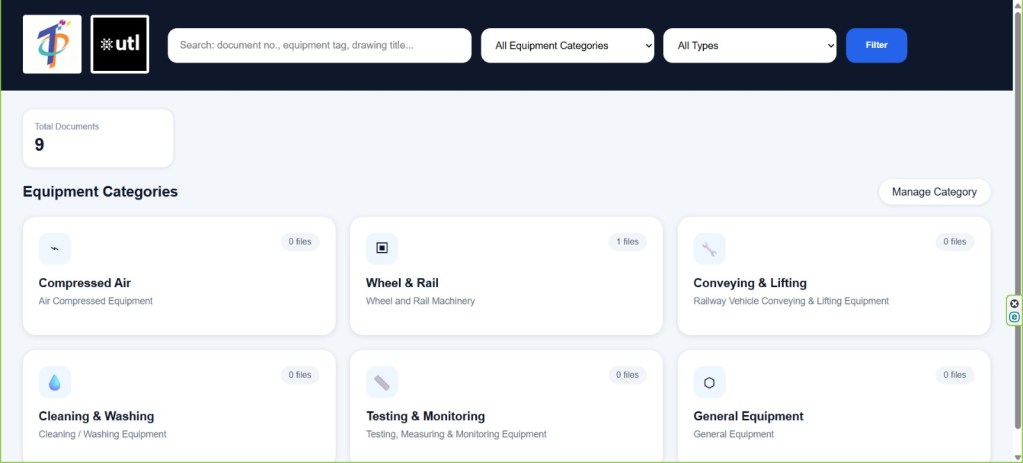
Topone implemented a comprehensive OCR Document Scanning and Electronic Document Management System (EDMS) solution to support the client’s digital transformation initiative.
Project Implementation:
- Conducted a document assessment and developed a structured digitization plan.
- Scanned a large volume of historical engineering drawings, floor plans, and design documents in high resolution to ensure image clarity and long-term preservation.
- Applied Optical Character Recognition (OCR) technology to convert scanned documents into searchable digital files.
- Indexed documents with metadata and OCR text to facilitate rapid search and retrieval.
- Imported all digitized documents into the Electronic Document Management System (EDMS).
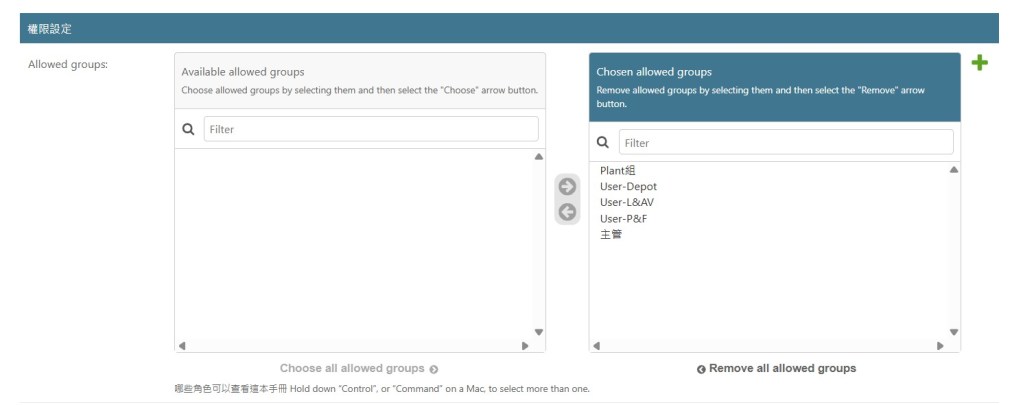
- Configured role-based access permissions to ensure document security and controlled access.
- Enabled users to securely access and search documents from desktop computers and mobile devices, including iPads.
Result:
The digital transformation project was completed successfully, enabling the client to modernize its document management process.
- Successfully digitized and indexed a large archive of historical documents.
- Preserved engineering drawings and floor plans in high-resolution digital format.
- Eliminated the need to frequently access physical archives.
- Enabled users to search and retrieve documents instantly by entering keywords.
- Improved document accessibility from both office and remote locations.
Impact & Benefits:
- Reduced physical storage requirements and office space usage.
- Enhanced operational efficiency by significantly reducing document retrieval time.
- Improved document security and access control.
- Preserved valuable historical engineering records for long-term retention.
- Enabled staff to access documents anytime and anywhere through the EDMS platform.
- Accelerated digital transformation and improved overall business productivity.
By implementing Topone’s OCR Document Scanning and EDMS solution, the client successfully transformed decades of paper-based records into a secure, searchable, and easily accessible digital archive.

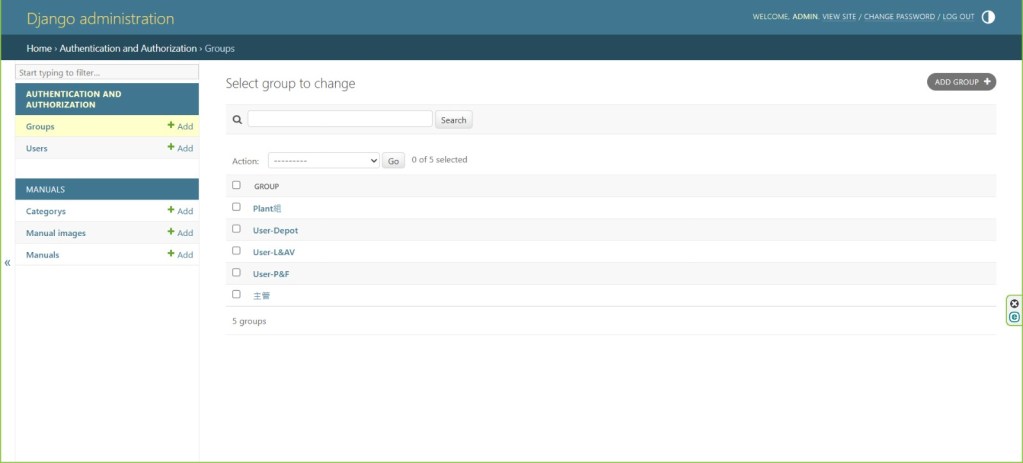
Case Study 9
Legacy Windows Small Business Server 2008 Upgrade & Hybrid Infrastructure Modernization in Hong Kong
Context & Challenges:
A Hong Kong-based company was running its core IT infrastructure on Microsoft Windows Small Business Server (SBS) 2008, which had reached end-of-support and posed significant security, reliability, and business continuity risks.
The client’s aging infrastructure supported critical services including Active Directory, file sharing, and business applications. The company also operated a warehouse location and required secure connectivity between multiple sites while improving disaster recovery capabilities.
The client engaged Topone to modernize its IT infrastructure, improve resilience, and establish a hybrid environment integrating both on-premises and datacenter resources.
Challenge:
- Replace the legacy Windows SBS 2008 environment, which was no longer supported by Microsoft.
- Upgrade the Active Directory domain to a modern and supported platform.
- Migrate file sharing services while minimizing disruption to daily operations.
- Provide business continuity and disaster recovery capabilities.
- Establish secure connectivity between the head office, warehouse, and Topone datacenter.
- Implement a reliable backup strategy for critical business systems and data.
Solution:
Topone designed and implemented a hybrid infrastructure solution combining on-premises and datacenter resources.
Project Implementation:
1. Active Directory Modernization
- Migrated the existing SBS 2008 Active Directory environment to Microsoft Windows Server 2022 Standard.
- Deployed a new Windows Server 2022 domain controller at the client’s office.
- Deployed an additional Windows Server 2022 domain controller at the Topone datacenter to provide redundancy and improve business continuity.
- Performed Active Directory replication and validation to ensure seamless authentication services.
2. File Server Migration
- Migrated file sharing services from the legacy SBS 2008 server to a new Windows Server 2022 file server hosted in the Topone datacenter.
- Preserved existing file permissions and user access rights during migration.
- Validated data integrity and user accessibility after migration completion.
3. Secure Site-to-Site Connectivity
- Upgraded the client’s existing Fortinet firewalls to improve network performance and security.
- Established a secure IPSec site-to-site VPN tunnel between the client’s office and the Topone datacenter.
- Implemented an additional site-to-site VPN connection between the head office and warehouse to enable secure inter-office communication.
4. Backup & Disaster Recovery
- Implemented Veeam Backup & Replication for the client’s on-premises ERP server, backing up data to a newly deployed NAS located at the client’s office for rapid local recovery.
- Deployed a separate Veeam backup solution to protect the new file server hosted in the Topone datacenter, with backups stored on a dedicated NAS in the datacenter environment.
- Configured automated backup schedules and monitoring to ensure ongoing data protection.
Result:
The infrastructure modernization project was completed successfully with minimal business disruption.
- Successfully retired the legacy Windows SBS 2008 server.
- Upgraded the Active Directory environment to Windows Server 2022.
- Migrated file services to a secure and resilient datacenter environment.
- Established secure VPN connectivity between office, warehouse, and datacenter locations.
- Implemented comprehensive backup and disaster recovery solutions for critical systems.
Impact & Benefits:
- Eliminated risks associated with unsupported legacy systems.
- Improved cybersecurity through modern operating systems and upgraded firewalls.
- Increased infrastructure resilience with redundant domain controllers across multiple locations.
- Enhanced business continuity through datacenter-hosted services and robust backup solutions.
- Improved collaboration and secure connectivity between office and warehouse locations.
- Reduced downtime risks and accelerated disaster recovery capabilities.
- Provided a scalable foundation to support future business growth.
By partnering with Topone, the client successfully modernized its legacy IT infrastructure, improved security, and established a resilient hybrid environment capable of supporting future business requirements.
Case Study 10
Microsoft 365 Migration & Modern Workplace Solution in Hong Kong
Background:
Many businesses are moving away from traditional on-premises servers to embrace a modern cloud-based workplace. The client wanted to eliminate the need to maintain Exchange servers and file servers in the office while enabling employees to work securely from anywhere.
To support remote and hybrid working, the client decided to migrate its existing IT environment to Microsoft 365, providing secure email, file sharing, collaboration, and device management through a single cloud platform.
Challenges:
The client required a migration solution that could:
- Migrate on-premises Microsoft Exchange Server 2013/2016 mailboxes to Microsoft 365 with minimal disruption.
- Move company shared folders to SharePoint Online and OneDrive.
- Preserve all emails and business files throughout the migration process.
- Enable secure remote working without relying on office servers.
- Improve Microsoft 365 security with Multi-Factor Authentication (MFA) and advanced email protection.
- Standardize company computers and mobile devices using Microsoft Intune and Windows Autopilot.
- Provide ongoing Microsoft 365 administration and technical support after migration.
Solution:
Topone planned and executed a complete Microsoft 365 Modern Workplace migration, helping the client transition from an on-premises infrastructure to a secure cloud environment with virtually no business interruption.
Exchange Online Migration
Our engineers migrated Microsoft Exchange Server 2013, 2016, 2019 mailboxes to Exchange Online using MigrationWiz.
To minimise downtime, the migration was performed in two phases:
- Initial Migration – Approximately 95% of mailbox data was migrated while users continued using their existing email system.
- Final Cutover Migration – After updating the company’s DNS MX records to Microsoft 365, a final synchronization migrated newly received emails, ensuring no messages were lost during the transition.
This phased migration approach enabled users to continue working normally throughout the project while ensuring a smooth and reliable email migration.
SharePoint Online & OneDrive Migration
Company shared folders were migrated from the office file server to Microsoft SharePoint Online.
Using tools such as FreeFileSync and FastCopy, TopOne performed staged file migrations by:
- Copying approximately 95–98% of data during the initial migration.
- Performing a final differential synchronization immediately before cutover to capture newly created or modified files.
After migration, users accessed company files securely through OneDrive and SharePoint Online simply by signing in with their Microsoft 365 accounts, eliminating the need for traditional file servers and VPN access for everyday file sharing.
Microsoft Teams Collaboration
Microsoft Teams was deployed as the company’s central collaboration platform for:
- Team chat
- Online meetings
- Video conferencing
- Secure document sharing
This improved communication between office-based and remote employees while reducing dependence on third-party collaboration tools.
Microsoft 365 Security Enhancement
To strengthen cybersecurity, Topone implemented:
- Multi-Factor Authentication (MFA) for all Microsoft 365 users.
- Microsoft Defender for Office 365 (where licensed), including Safe Links and Safe Attachments to protect against phishing attacks and malicious email attachments.
- Security best practices for Microsoft 365 administration and user access.
Modern Device Management
For clients adopting Microsoft Intune and Microsoft Entra ID, Topone implemented a modern endpoint management solution that included:
- Windows Autopilot deployment for standardized PC provisioning.
- Automatic device enrollment into Microsoft Intune.
- Microsoft Entra ID device management.
- Standardized security policies and application deployment.
- Remote device wipe capability to protect company data if a laptop or mobile device was lost or stolen.
- Microsoft Intune enrollment and management for both Windows computers and company mobile devices.
Ongoing Managed Microsoft 365 Support
Following the migration, Topone continued to provide fully managed Microsoft 365 support, including tenant administration, user management, licensing, security monitoring, troubleshooting, and ongoing technical assistance to ensure the client’s cloud environment remained secure, reliable, and up to date.
Result:
The client successfully transformed its traditional server-based environment into a secure Microsoft 365 Modern Workplace without disrupting daily operations. Employees can now securely access email, files, and collaboration tools from anywhere while benefiting from enhanced security, simplified IT management, and improved business flexibility.
Business Benefits:
- Successful migration from Exchange Server 2013/2016 to Microsoft 365 with virtually zero business downtime.
- Secure cloud-based email with no loss of mailbox data during migration.
- Centralized file storage using SharePoint Online and OneDrive.
- Improved collaboration through Microsoft Teams.
- Enhanced Microsoft 365 security with Multi-Factor Authentication and Microsoft Defender for Office 365.
- Modern endpoint management using Microsoft Intune, Windows Autopilot, and Microsoft Entra ID.
- Secure remote access to business resources without maintaining on-premises email or file servers.
- Ongoing managed Microsoft 365 administration and technical support provided by Topone.
Case Study 11
FortiGate High Availability (HA) Firewall Refresh & VPN Migration in Hong Kong
Background:
As network security requirements continue to evolve, businesses must regularly upgrade their firewall infrastructure to maintain optimal performance, cybersecurity protection, and vendor support. A client operating a mission-critical network required the replacement of its existing FortiGate 201F High Availability (HA) firewall cluster with two new FortiGate 121G appliances while ensuring business operations continued without significant disruption.
The client also relied on multiple Site-to-Site VPN tunnels and remote access VPN services to connect branch offices and support remote employees, making careful migration planning essential.
Challenges:
The client required a firewall migration that could:
- Replace the existing FortiGate 201F HA cluster with a new FortiGate 121G HA cluster.
- Preserve existing firewall policies, security configurations, and network architecture.
- Migrate Site-to-Site VPN connections without affecting communication between offices.
- Maintain SSL VPN and IPsec VPN services for remote users.
- Minimize downtime during the migration window.
- Ensure business-critical Internet and network services resumed immediately after cutover.
Solution:
Before the scheduled migration, Topone completed extensive preparation and validation work within our engineering laboratory to reduce implementation risks and shorten onsite deployment time.
The project included:
- Registration of the new FortiGate appliances and installation of the latest recommended FortiOS firmware.
- Professional migration of the existing firewall configuration to the new hardware platform using Fortinet’s supported configuration conversion process.
- Validation of interface assignments, firewall policies, routing configuration, High Availability settings, Site-to-Site VPN tunnels, SSL VPN, IPsec VPN, and security services.
- Comprehensive laboratory testing of the complete firewall configuration before deployment.
- Configuration and synchronization of the new High Availability cluster to ensure redundancy and automatic failover.
- Creation of verified backup configurations before production deployment.
Topone worked closely with the client’s IT team to schedule the migration during a planned maintenance window, reducing the impact on business operations. During the cutover, the existing firewall appliances were replaced with the new HA cluster, network connectivity was verified, and engineers remained onsite to monitor system stability and provide immediate support until all services were confirmed to be operating normally.
Result:
The firewall infrastructure was successfully upgraded to the latest FortiGate platform with minimal service interruption. Internet connectivity, Site-to-Site VPN tunnels, SSL VPN, IPsec VPN, and internal network services were restored quickly following the migration, allowing employees to continue working with minimal disruption.
The client also benefited from a modern firewall platform with improved performance, enhanced security capabilities, and continued Fortinet support for future firmware updates and cybersecurity protection.
Business Benefits:
- Successful migration from FortiGate 201F High Availability cluster to FortiGate 121G High Availability cluster.
- Minimal business interruption through careful planning and comprehensive pre-deployment testing.
- Seamless migration of Site-to-Site VPN, SSL VPN, and IPsec VPN connectivity.
- Improved network security and firewall performance using the latest FortiGate platform.
- High Availability architecture providing automatic failover and increased network resilience.
- Reduced implementation risk through laboratory validation before production deployment.
- Ongoing managed firewall support, firmware maintenance, and security monitoring provided by Topone.
Case Study 12
Fully Managed IT Support Services for a Growing SME in Hong Kong
Background:
A growing professional services company with approximately 50 employees required a reliable IT partner to manage its entire IT environment. The company had no dedicated in-house IT department and wanted a single provider to deliver responsive technical support, proactive maintenance, cybersecurity management, cloud administration, backup monitoring, and strategic IT advice.
Rather than engaging multiple vendors, the client selected Topone to provide a fully managed IT support service that ensured stable daily operations while allowing employees to focus on their core business.
Challenges:
The client required an IT support partner that could:
- Provide unlimited day-to-day technical support for users.
- Resolve issues quickly with minimal disruption to business operations.
- Maintain servers, network infrastructure, Microsoft 365, and storage systems.
- Improve cybersecurity and reduce operational risks.
- Deliver proactive monitoring instead of only reacting to problems.
- Support new employee onboarding and account management.
- Coordinate with third-party software and Internet service providers when technical issues arose.
- Provide long-term IT planning while maintaining predictable monthly support costs.
Solution:
Topone implemented a comprehensive managed IT support service covering the client’s complete IT infrastructure.
Managed IT Onboarding
During the onboarding phase, our engineers established a complete understanding of the client’s IT environment by:
- Installing secure remote support software on servers and workstations to enable fast remote assistance.
- Verifying administrative access to firewalls, Windows servers, NAS storage, Microsoft 365, domain registrars, DNS services, and other critical platforms.
- Discovering and documenting network infrastructure, including firewalls, switches, wireless access points, servers, printers, and Internet services.
- Creating detailed technical documentation to support faster troubleshooting and ongoing maintenance.
This documentation enables our engineers to respond more efficiently whenever support is required.
Unlimited Remote & Onsite IT Support
Topone provides unlimited technical support through telephone, email, ticketing system, and secure remote assistance.
Our remote-first support approach allows engineers to resolve the majority of user issues immediately without waiting for an onsite visit.
Typical issues resolved remotely include:
- Microsoft Office and software issues.
- Shared folder and network drive access.
- Printing and scanning problems.
- Microsoft 365 support.
- User account administration.
- General Windows troubleshooting.
For hardware-related issues that require physical intervention, onsite engineers are arranged promptly.
Critical incidents such as server failures, Internet outages, or firewall failures receive immediate remote investigation, followed by onsite support in accordance with our Service Level Agreement (SLA).
Network Infrastructure Management
Our engineers manage the client’s network environment, including:
- FortiGate / Cisco / Sonicwall firewalls.
- Managed switches.
- Wireless access points.
- Network security policies.
- Firmware maintenance.
- Performance optimisation.
Where required, Cloudflare security services can also be implemented to provide web filtering and additional threat protection.
Server & Cloud Administration
Topone manages both on-premises and cloud infrastructure, including:
- Windows Server administration.
- NAS storage management.
- Microsoft 365 administration.
- Google Workspace administration.
- User permissions and access control.
- Identity and collaboration management.
Backup & Business Continuity
To protect business-critical information, Topone implemented enterprise backup solutions using Veeam Backup & Replication.
Our managed backup service includes:
- Daily backup monitoring.
- Verification of backup job status.
- Monthly restore testing to confirm backup integrity.
- Optional offline backup services for additional protection.
- Optional disaster recovery replication to a secure datacenter with defined recovery objectives and failover planning.
Proactive Monitoring & Security
Rather than waiting for failures to occur, Topone offers proactive monitoring services using enterprise monitoring platforms.
Optional services include:
- Real-time monitoring of servers and network infrastructure.
- Early warning alerts for hardware or service failures.
- Vulnerability scanning to identify security weaknesses before they become business risks.
- Microsoft Defender for Office 365, providing Safe Attachments and Safe Links protection against phishing attacks, malicious links, and zero-day malware.
User Lifecycle Management
Topone also supports the client’s daily business operations by managing employee onboarding and offboarding, including:
- User account creation and removal.
- Standardised workstation deployment.
- Microsoft 365 licensing.
- Device provisioning.
- Security policy enforcement.
Result:
The client successfully transitioned from reactive IT support to a fully managed IT environment. Employees now receive fast technical assistance through unlimited remote and onsite support, while proactive monitoring, regular maintenance, and continuous security improvements significantly reduce operational risks.
By outsourcing IT management to Topone, the client can focus on growing the business while relying on an experienced engineering team to maintain a secure, stable, and efficient IT environment.
Business Benefits:
- Unlimited remote and onsite IT support delivered by experienced engineers.
- Faster issue resolution through remote-first support and comprehensive IT documentation.
- Stable and secure management of servers, firewalls, Microsoft 365, and network infrastructure.
- Proactive monitoring that identifies issues before they affect business operations.
- Managed backup services with ongoing monitoring and restore verification.
- Improved cybersecurity through vulnerability management and Microsoft 365 protection.
- Simplified onboarding and offboarding with standardised user and device provisioning.
- A predictable monthly managed IT service that provides long-term operational stability and supports future business growth.
Case Study 13
Microsoft 365 Cybersecurity Hardening Solution in Hong Kong
Background:
Many organizations successfully adopt Microsoft 365 for email, file sharing, and collaboration but continue to operate with default security settings. As cyber threats such as phishing, credential theft, ransomware, and business email compromise (BEC) continue to increase, additional security controls are essential to protect company data and user accounts.
A client engaged Topone to strengthen the security of its Microsoft 365 environment while maintaining a simple and productive user experience.
Challenges:
The client required a cybersecurity solution that could:
- Prevent unauthorized access to Microsoft 365 accounts.
- Protect users against phishing emails, malicious links, and malware.
- Restrict access to sensitive company resources based on business requirements.
- Improve Microsoft 365 security without disrupting daily operations.
- Increase employee awareness of cybersecurity best practices.
Solution:
Topone performed a comprehensive security review of the client’s Microsoft 365 tenant and implemented multiple security layers based on Microsoft’s security best practices.
Multi-Factor Authentication (MFA)
To strengthen account security, Multi-Factor Authentication (MFA) was enabled for Microsoft 365 users.
Each user installed the Microsoft Authenticator application on their mobile device, providing secure identity verification when signing in to Microsoft 365 services such as Outlook, SharePoint Online, OneDrive, and Microsoft Teams.
This additional authentication layer significantly reduces the risk of compromised passwords leading to unauthorized account access.
Conditional Access
Where required, Topone implemented Conditional Access policies to protect sensitive business resources.
For example, SharePoint Online access can be restricted so that company documents are only accessible from approved office public IP addresses, reducing the risk of unauthorized remote access.
For organizations requiring more advanced endpoint security, Microsoft Intune can be integrated to enforce device compliance policies, ensuring that only trusted and managed devices are permitted to access Microsoft 365 resources.
Microsoft Defender for Office 365
To strengthen email security, TopOne deployed Microsoft Defender for Office 365 (where licensed).
Security policies included:
- Safe Links: to inspect web links at the time users click them, helping block phishing websites and malicious URLs.
- Safe Attachments: to analyse email attachments in a secure environment before delivery, protecting users from malware and zero-day threats.
These protections provide an additional layer of defence beyond traditional spam filtering.
Security Policy Review
Topone reviewed and strengthened the client’s Microsoft 365 security configuration by implementing security best practices, including identity protection, administrative security controls, user access management, and secure collaboration settings.
The objective was to reduce security risks while maintaining a smooth user experience.
User Security Awareness
Technology alone cannot prevent every cyberattack.
Topone provided guidance on Microsoft 365 security best practices, helping users recognise phishing emails, suspicious attachments, malicious links, and common social engineering techniques.
By combining user awareness with technical security controls, the client’s overall cybersecurity posture was significantly strengthened.
Result:
The client successfully transformed its Microsoft 365 environment into a more secure and resilient cloud platform. By implementing multiple security layers, including identity protection, email security, Conditional Access, and user awareness, the organization significantly reduced the likelihood of account compromise and phishing-related incidents while maintaining productivity for employees.
Business Benefits:
- Stronger Microsoft 365 account protection through Multi-Factor Authentication.
- Reduced risk of phishing attacks using Microsoft Defender for Office 365 Safe Links and Safe Attachments.
- Improved protection of SharePoint Online and business data through Conditional Access policies.
- Enhanced identity and access security based on Microsoft security best practices.
- Better protection against credential theft, malware, and business email compromise (BEC).
- Increased employee cybersecurity awareness and safer day-to-day use of Microsoft 365.
- A more secure Microsoft 365 environment supported by Topone’s ongoing cloud administration and cybersecurity services.
Following the security hardening project, TopOne continued to provide ongoing Microsoft 365 administration, security monitoring, and managed IT support to ensure the client’s cloud environment remained secure and compliant.
Case Study 14
Proactive IT Monitoring & Backup Assurance Services in Hong Kong
Background:
Many businesses only become aware of IT problems after users report system failures or discover that backups have failed when data needs to be restored. Without continuous monitoring and regular health checks, small issues can develop into major outages, resulting in downtime, data loss, and reduced productivity.
To reduce these risks, a client engaged Topone to provide proactive IT monitoring and backup assurance services, ensuring critical systems remained healthy, backups completed successfully, and potential issues were identified before they affected daily operations.
Challenges:
The client required a managed monitoring solution that could:
- Detect server and network issues before they disrupted business operations.
- Ensure daily backups completed successfully and could be restored when required.
- Monitor storage capacity and system health proactively.
- Keep servers and infrastructure updated through regular maintenance.
- Provide ongoing health checks to maintain a stable and secure IT environment.
Solution:
Topone implemented a proactive monitoring and maintenance service that continuously oversees the client’s IT infrastructure rather than waiting for users to report problems.
Infrastructure Monitoring
Our engineers monitor the health and availability of servers, network devices, storage systems, and business-critical services through centralized monitoring platforms.
When abnormal conditions or potential failures are detected, alerts are generated for investigation, allowing our engineers to identify and resolve many issues before they impact users.
Backup Assurance
A successful backup job does not automatically guarantee that business data can be restored when needed. Topone therefore provides continuous backup assurance rather than simply monitoring backup software.
Every scheduled backup generates status notifications that are automatically recorded and reviewed. Daily backup results are tracked, including successful, failed, and warning jobs, enabling our engineers to quickly identify missing backups or recurring issues.
Any failed or warning backup jobs are investigated as part of our daily operational routine to restore backup protection as quickly as possible.
To further verify backup reliability, Topone performs scheduled restore testing to confirm that backup restore points remain usable and that business files can be successfully recovered when required.
Patch Management & Preventive Maintenance
Regular maintenance helps reduce operational risks and improves long-term system stability.
Topone performs ongoing maintenance activities, including operating system updates, infrastructure reviews, and preventive maintenance to keep servers and business systems operating securely and efficiently.
Monthly Health Checks
Each month, our engineers perform a comprehensive review of the client’s IT environment.
The health check includes reviewing monitoring dashboards, examining firewall health and security events, identifying abnormal system behaviour, checking storage capacity, and confirming that backup protection continues to operate as expected.
Recommendations are provided whenever improvements can further strengthen security, performance, or system reliability.
Result:
By implementing proactive monitoring and backup assurance, the client moved from a reactive support model to a preventive maintenance approach. Potential issues are now identified much earlier, backup failures are detected before they become critical, and regular health reviews help maintain a stable, secure, and reliable IT environment.
Instead of discovering problems after business operations are affected, the client benefits from continuous oversight that reduces downtime and improves overall system reliability.
Business Benefits:
- Early detection of infrastructure issues before users experience service disruption.
- Continuous monitoring of servers, network devices, and storage systems.
- Daily verification of backup status with prompt investigation of failed or warning backup jobs.
- Regular restore testing to ensure backup data can be successfully recovered.
- Improved business continuity through reliable backup assurance and preventive maintenance.
- Monthly IT health checks with recommendations to improve security, performance, and system stability.
- Reduced business downtime through proactive monitoring and early issue resolution.
- Greater confidence that critical business systems and data remain protected under Topone’s managed IT support services.
Case Study 15
New Office IT Infrastructure Deployment Solution in Hong Kong
Background:
When businesses establish a new office, a well-designed IT infrastructure is essential to support daily operations from day one. Network planning, structured cabling, wireless coverage, server room design, workstation deployment, and Internet connectivity all need to be carefully coordinated before employees move into the new premises.
A growing company engaged Topone to design and deploy a complete IT infrastructure for its new office, providing a secure, scalable, and reliable environment that could support future business expansion.
Challenges:
The client required an end-to-end IT infrastructure solution that could:
- Design a secure and scalable office network.
- Ensure complete Wi-Fi coverage throughout the office.
- Plan structured cabling before office renovation was completed.
- Design an efficient server room layout.
- Coordinate with interior designers and renovation contractors during construction.
- Deploy workstations, printers, and network equipment before staff moved into the new office.
- Provide ongoing maintenance and support after project completion.
Solution:
Topone managed the complete IT infrastructure deployment, working closely with the client and the renovation team from the early planning stage through to final system commissioning.
Network Infrastructure Design
Our engineers designed the office network based on the client’s business requirements, selecting suitable enterprise-grade firewalls, managed switches, and wireless access points to provide secure, reliable, and scalable connectivity.
Wireless access point locations were planned using the office floor plan to achieve effective Wi-Fi coverage across work areas, meeting rooms, and shared spaces.
Clients could either purchase new network equipment or join Topone’s Managed Network Device Leasing Service, allowing them to benefit from enterprise-grade hardware together with ongoing maintenance, firmware updates, technical support, and hardware replacement under a predictable monthly service plan.
Structured Cabling Planning
During the office planning phase, Topone worked closely with the client, interior designer, and renovation contractor to determine the location of:
- Network data outlets.
- Voice outlets.
- Wireless access points.
- Printers.
- Meeting room equipment.
- Server room.
- Internet service provider fibre termination point.
Structured cabling could be completed either by Topone or by the client’s appointed renovation contractor. In most projects, the renovation contractor installed the network cabling alongside electrical wiring, allowing the project to be completed more efficiently while ensuring all IT infrastructure requirements were incorporated into the office design.
Server Room Deployment
Topone planned and installed the server room infrastructure, including:
- Firewall installation.
- Managed switches.
- Server rack equipment.
- NAS storage.
- Patch panels.
- Internet connectivity.
All equipment was professionally configured, labelled, tested, and documented to simplify future maintenance and troubleshooting.
Workstation & Peripheral Deployment
Before employees moved into the new office, Topone deployed and configured user workstations, including:
- Windows computer installation and configuration.
- Microsoft 365 account setup.
- Printer installation.
- Shared network drive configuration.
- Email setup.
- Internet connectivity testing.
This ensured employees could begin working immediately on the first day of office operations.
Result:
The client successfully opened its new office with a fully operational IT environment delivered on schedule. Employees had immediate access to secure Internet connectivity, wireless networking, printers, Microsoft 365 services, and business applications from the first working day.
By involving Topone during the planning stage, the client avoided costly infrastructure changes after construction was completed while ensuring the office network could support future business growth.
Business Benefits:
- Complete end-to-end IT infrastructure deployment for a brand-new office.
- Professionally designed network architecture with enterprise-grade security.
- Reliable office-wide Wi-Fi coverage through planned wireless access point placement.
- Well-organised server room designed for future expansion and simplified maintenance.
- Close coordination with designers and renovation contractors throughout the project.
- Flexible choice between purchasing equipment or joining TopOne’s Managed Network Device Leasing Service.
- Fully configured workstations and printers ready before employees moved into the office.
- Ongoing managed IT support and maintenance to ensure long-term stability and business continuity.
Case Study 16
Cloudflare SASE Deployment for Secure Hybrid Workplace in Hong Kong
Background:
A professional services company with approximately 80 employees had adopted Microsoft 365 as its primary productivity platform. Employees used Exchange Online for email, SharePoint Online and OneDrive for Business for document collaboration, while a local NAS remained in the office to store operational files that had not yet migrated to the cloud.
The company was also developing a new AI-powered ERP system hosted by a third-party provider. Due to the provider’s security policy, access to the ERP system was restricted to approved public IP addresses located in the United States.
The client required a secure networking solution that could provide employees with seamless access to Microsoft 365, the office NAS, and the new ERP platform, regardless of whether they were working from the office, home, or travelling.
Challenges:
The client required a solution that could:
- Provide secure remote access to both cloud and on-premises resources.
- Deliver a fixed and trusted public IP address for accessing the AI-powered ERP platform.
- Connect Microsoft 365, SharePoint Online, OneDrive, and the office NAS into a unified user experience.
- Eliminate the complexity of traditional VPN connections.
- Improve network security for users working from any location.
- Support future cloud adoption and business expansion.
Solution:
Topone designed and implemented a Cloudflare Secure Access Service Edge (SASE) solution that unified the client’s cloud services, on-premises resources, and external business applications into a single secure access platform.
Cloudflare SASE Deployment
Cloudflare Zero Trust was deployed to provide secure identity-based access for all employees.
Instead of relying on traditional VPN technology, user devices connected securely through the Cloudflare WARP client, allowing encrypted access to authorised business resources from any location.
Static Egress IP Addresses
To satisfy the ERP provider’s geographic access requirements, Topone configured two dedicated Cloudflare egress IP addresses.
These fixed public IP addresses provided:
- Consistent outbound connectivity.
- High availability through redundant egress paths.
- Compliance with the ERP provider’s approved source IP requirements.
- Secure access to the AI-powered ERP platform without exposing the company’s office Internet connection.
Unified Access to Business Resources
Topone integrated multiple business platforms into a single secure environment, allowing employees to access:
- Microsoft Exchange Online.
- Microsoft SharePoint Online.
- OneDrive for Business.
- Office NAS file storage.
- AI-powered ERP system.
Users experienced a consistent authentication process without needing separate VPN connections for different systems.
Secure Remote Workforce
Cloudflare WARP was installed on employee laptops, providing secure connectivity whether users worked:
- In the office.
- From home.
- At customer sites.
- While travelling overseas.
All traffic was encrypted and protected by Cloudflare’s global security network before reaching business applications.
Centralised Security Policies
Access policies were centrally managed, enabling administrators to control user permissions, application access, and security settings from a single management platform.
This simplified administration while improving visibility into user access and network activity.
Result:
The client successfully transformed its hybrid working environment by replacing fragmented remote access methods with a modern Cloudflare SASE architecture.
Employees could securely access Microsoft 365, the office NAS, and the new AI-powered ERP platform through a single secure connection, regardless of their location.
The deployment also satisfied the ERP provider’s requirement for approved United States source IP addresses while improving overall network security and simplifying remote access management.
Business Benefits:
- Secure hybrid workplace supporting office, home, and mobile users.
- Unified access to Microsoft 365, SharePoint Online, OneDrive, office NAS, and the AI-powered ERP platform.
- Stable dedicated Cloudflare egress IP addresses for third-party application access.
- Secure encrypted connectivity using Cloudflare WARP without traditional VPN complexity.
- Improved cybersecurity through Zero Trust access policies and identity-based authentication.
- Simplified IT administration with centralised access management.
- Flexible and scalable SASE architecture that supports future cloud services and business growth.
- Ongoing monitoring, administration, and technical support provided by Topone to ensure long-term security and operational stability.
Case Study 17
Ransomware Recovery & Business Continuity Solution in Hong Kong
Background:
Cyberattacks and ransomware have become one of the most significant threats to businesses of all sizes. A single malicious email attachment or compromised user account can encrypt critical business data within minutes, bringing daily operations to a halt.
A client experienced a ransomware attack that encrypted several virtual file servers, preventing employees from accessing company documents and disrupting normal business operations. Fortunately, the client had previously engaged Topone to design and implement a comprehensive backup and disaster recovery strategy.
Challenges:
The client required immediate assistance to:
- Stop the ransomware from spreading across the network.
- Protect unaffected systems from further infection.
- Restore business-critical servers as quickly as possible.
- Recover company data with minimal data loss.
- Resume normal business operations with the shortest possible downtime.
- Investigate the incident and strengthen security to reduce future risks.
Solution:
Topone immediately activated its incident response and disaster recovery procedures to minimise business disruption.
Incident Response
Upon receiving the emergency call, our engineers remotely assessed the situation and instructed the client to isolate affected systems from the network immediately.
Potentially compromised servers and workstations were disconnected to prevent further encryption while unaffected systems were secured for investigation.
The engineering team worked closely with the client throughout the incident, providing regular updates and clear recovery expectations to management and end users.
Backup & Recovery Strategy
Before the incident, TopOne had implemented a multi-layer backup strategy designed to protect the client’s critical business data.
The solution included:
- Daily image-based backups using Veeam Backup & Replication.
- Backup storage on dedicated NAS or external USB storage.o
- Optional replication to a standby virtualization host for faster disaster recovery.
- Offline backup rotation using alternating backup storage devices, ensuring one backup copy remained disconnected from the network and protected from ransomware attacks.
To ensure backups remain reliable, Topone’s Managed Backup Assurance service includes scheduled monthly restore tests. Our engineers regularly restore selected files from backup restore points to verify that business data can be successfully recovered when required. This validation provides confidence that backup jobs are not only completing successfully but are also recoverable during an actual disaster.
For organizations requiring a higher level of automation, Topone also offers Veeam SureBackup as an optional service. SureBackup automatically verifies backup integrity by starting virtual machines in an isolated testing environment and confirming that systems can boot successfully without affecting the production environment. This enables clients to continuously validate backup recoverability while reducing the need for manual restore testing.
Server & Active Directory Recovery
After confirming that the ransomware had been contained, Topone prioritised system recovery based on business impact.
Critical infrastructure services, including Active Directory, were restored first to re-establish user authentication and core network services.
Business-critical virtual servers were then recovered using verified Veeam backup restore points, followed by file servers and application servers according to the agreed recovery plan.
Throughout the recovery process, our engineers verified the integrity of restored systems before allowing users to reconnect.
Recovery Verification
Once production systems had been restored, comprehensive testing was performed to verify:
- User authentication.
- File access.
- Business application functionality.
- Network connectivity.
- Backup operations.
- Security controls.
Only after successful validation were systems returned to full production.
Post-Incident Security Improvements
Following the recovery, Topone conducted a security review with the client and recommended additional improvements to strengthen future resilience.
Recommendations included:
- Multi-Factor Authentication (MFA).
- Enhanced email security.
- Endpoint protection.
- Vulnerability scanning.
- Security awareness training.
- Regular backup restore testing.
- Continued proactive monitoring and managed IT support.
Result:
The ransomware incident was successfully contained, and critical business systems were restored from verified backups without paying any ransom.
Because a comprehensive backup and disaster recovery solution had already been implemented, the client was able to resume business operations significantly faster than would otherwise have been possible.
The incident also reinforced the importance of proactive cybersecurity, backup assurance, and disaster recovery planning as essential components of business continuity.
Business Benefits:
- Rapid incident response to minimise the spread of ransomware.
- Structured recovery process prioritising critical business systems.
- Reliable recovery using verified Veeam Backup & Replication restore points.
- Offsite disaster recovery through secure datacenter replication.
- Additional protection through offline backup rotation against ransomware.
- Reduced business downtime and improved operational resilience.
- Greater confidence in backup reliability through ongoing monitoring and scheduled restore testing.
- Long-term business continuity supported by Topone’s Managed IT Support, Managed Backup Assurance, and Cybersecurity services.
Key Takeaway:
Ransomware attacks cannot always be prevented, but their impact can be dramatically reduced with proper preparation.
By combining enterprise backup solutions, offsite replication, offline backups, regular restore testing, and a well-defined disaster recovery process, Topone helps businesses recover quickly from cyber incidents and continue operating with confidence.
Case Study 18
Microsoft Intune & Windows Autopilot Deployment in Hong Kong
Background:
A growing enterprise with approximately 100 employees planned to replace its existing computers with new Windows 11 laptops as part of its digital transformation initiative. The company wanted every device to be configured with the same security policies, business applications, and Microsoft 365 settings while eliminating the traditional manual setup process.
As the organization adopted a cloud-first IT strategy, it required a modern device management solution that would simplify deployment, strengthen endpoint security, and enable employees to work securely from the office, home, or remote locations.
Challenges:
The client required a solution that could:
- Deploy 100 new Windows 11 laptops quickly and consistently.
- Eliminate manual PC imaging and configuration.
- Ensure every device complied with the company’s security policies.
- Automatically deploy Microsoft 365 and business applications.
- Encrypt company data to reduce the risk of data loss.
- Support employees working remotely without requiring IT engineers to configure every computer onsite.
- Simplify future employee onboarding and device replacement.
Solution:
Topone implemented a modern cloud-based endpoint management solution using Microsoft Intune, Windows Autopilot, and Microsoft Entra ID.
Windows Autopilot Deployment
Instead of manually installing and configuring every laptop, Topone registered all new devices with Windows Autopilot before deployment.
Each employee simply connected the new laptop to the Internet and signed in using their Microsoft 365 account. Windows Autopilot automatically configured the device according to the company’s deployment profile without requiring hands-on assistance from an engineer.
This significantly reduced deployment time while ensuring every computer was configured consistently.
Microsoft Intune Device Management
Microsoft Intune was deployed to centrally manage all company laptops from a single cloud management platform.
TopOne configured device policies covering:
- Security configuration.
- Device compliance.
- Windows Update management.
- Application deployment.
- Device inventory.
- Endpoint management.
This allows IT administrators to manage company devices remotely throughout their entire lifecycle.
Microsoft Entra ID Join
All laptops were joined directly to Microsoft Entra ID, allowing users to authenticate securely using their Microsoft 365 identities without relying on traditional on-premises Active Directory infrastructure.
This cloud-native approach supports flexible working while simplifying identity management and reducing infrastructure requirements.
BitLocker Drive Encryption
To protect sensitive company information, BitLocker drive encryption was enabled across all Windows 11 laptops.
If a laptop is lost or stolen, business data remains encrypted and protected against unauthorized access, helping reduce the risk of data breaches.
Microsoft OneDrive Integration
OneDrive for Business was automatically configured during device deployment.
Users’ Desktop, Documents, and Pictures folders were synchronized to Microsoft 365, providing:
- Automatic file backup.
- Secure cloud storage.
- Seamless file access across multiple devices.
- Simplified device replacement with minimal data migration.
Automated Application Deployment
TopOne configured Microsoft Intune to automatically install approved business applications during device provisioning.
Examples included:
- Microsoft 365 Apps.
- Microsoft Teams.
- Remote support software – Teamviewer.
- PDF software.
- Approved line-of-business applications.
This ensured every employee received a consistent working environment without requiring manual software installation.
Security Baseline & Compliance
Topone implemented Microsoft’s recommended security baselines to strengthen endpoint protection.
The deployment included:
- BitLocker enforcement.
- Windows security policies.
- Microsoft Defender configuration.
- Password and authentication policies.
- Device compliance policies.
- Operating system update management.
These security controls helped ensure every device complied with the organization’s cybersecurity requirements from the first day of use.
Remote Device Deployment
Because the entire deployment process was cloud-based, laptops could be delivered directly to employees regardless of their location.
Whether users worked in the office, from home, or at remote branch offices, they could complete device setup independently by signing in with their Microsoft 365 account, while Topone remotely monitored deployment progress and provided assistance when required.
Result:
The client successfully deployed 100 Windows 11 laptops with a standardized configuration and consistent security policies. Employees were able to begin working immediately after signing in, while the IT team significantly reduced the time and effort required for device deployment.
The cloud-based management platform also simplified future device administration, software deployment, security policy enforcement, and employee onboarding.
Business Benefits:
- Rapid deployment of 100 Windows 11 laptops using Windows Autopilot.
- Standardized device configuration across the organization.
- Centralized endpoint management through Microsoft Intune.
- Secure cloud authentication using Microsoft Entra ID.
- Full disk encryption with BitLocker to protect business data.
- Automatic OneDrive synchronization for user data protection and simplified device replacement.
- Consistent deployment of Microsoft 365 and approved business applications.
- Remote device provisioning without requiring engineers to configure every laptop onsite.
- Faster employee onboarding and simplified future hardware refresh projects.
- Ongoing endpoint management, security policy administration, and Microsoft 365 support provided by TopOne’s Managed IT Support services.
Key Takeaway:
Modern endpoint deployment is no longer about manually imaging computers one by one. By combining Windows Autopilot, Microsoft Intune, Microsoft Entra ID, and Microsoft 365, Topone enables businesses to deploy secure, standardized devices at scale while supporting today’s hybrid workforce. The result is faster onboarding, stronger security, simplified IT management, and a modern workplace ready for future growth.
Case Study 19
Cybersecurity Modernization with Multi-Layer Endpoint Protection in Hong Kong
Background:
Cyber threats continue to evolve rapidly, with ransomware, phishing attacks, malicious email attachments, compromised websites, infected USB devices, and software vulnerabilities becoming the most common causes of security incidents. Many organizations still rely on traditional antivirus software, leaving critical security gaps that attackers can exploit.
A company with approximately 120 employees engaged Topone to modernize its cybersecurity strategy by implementing a comprehensive multi-layer endpoint protection solution. The objective was not simply to replace antivirus software, but to establish a defence-in-depth architecture that protects users, devices, email, and business data while improving visibility across the entire IT environment.
Challenges:
The client required a cybersecurity solution that could:
- Protect company computers against ransomware and advanced malware.
- Reduce phishing attacks delivered through email.
- Prevent malware introduced through USB storage devices.
- Identify security vulnerabilities before they could be exploited.
- Improve visibility into endpoint security across all devices.
- Centralize security management and policy enforcement.
- Support long-term cybersecurity improvement without increasing administrative complexity.
Solution:
Topone designed and implemented a multi-layer cybersecurity architecture, ensuring that if one security control failed, additional protection layers continued defending the organization.
Instead of relying on a single antivirus solution, multiple complementary security controls were deployed to protect every stage of a potential cyberattack.
Layer 1 – Email Security
Since phishing emails remain one of the most common entry points for ransomware, Topone first strengthened the client’s Microsoft 365 email security.
For organizations using Microsoft 365 Business Premium or Microsoft Defender for Office 365, we implemented advanced email protection including:
- Safe Links to inspect URLs when users click them.
- Safe Attachments to analyse email attachments before delivery.
- Enhanced anti-phishing policies.
- Email security policies based on Microsoft’s security best practices.
This first layer significantly reduces the chance of malicious emails reaching end users.
Layer 2 – Advanced Endpoint Protection
Topone deployed enterprise Endpoint Detection and Response (EDR) to protect every company computer against modern cyber threats.
Unlike traditional antivirus software, EDR continuously monitors system behaviour and can detect suspicious activities associated with ransomware, fileless malware, privilege escalation, and other advanced attacks.
Depending on the client’s operational requirements, Topone can deploy leading enterprise solutions including SentinelOne.
For this project, SentinelOne was selected to provide:
- Behaviour-based threat detection.
- Real-time ransomware protection.
- Automatic threat isolation.
- Centralized endpoint management.
- Continuous monitoring of endpoint activity.
Rather than depending solely on known virus signatures, the platform continuously analyses suspicious behaviour and automatically responds to emerging threats.
Layer 3 – Device Protection & USB Control
Removable storage devices remain a common source of malware infections.
Topone implemented device control policies to restrict unauthorized USB storage devices while allowing approved business devices where necessary.
To further strengthen ransomware resilience, endpoint protection also provides rollback capability using protected shadow copies. If ransomware encrypts user files, affected systems can be restored quickly with a single administrative action, minimizing downtime and reducing data loss.
Layer 4 – Vulnerability Management
Preventing cyberattacks also requires reducing the organization’s attack surface.
Topone performed comprehensive vulnerability assessments across servers, workstations, and network infrastructure to identify:
- Missing security patches.
- Outdated software.
- Weak system configurations.
- Known security vulnerabilities.
- Compliance issues.
Depending on the client’s security requirements and budget, vulnerability assessments can be performed using:
- Greenbone Vulnerability Management for cost-effective protection suitable for small and medium-sized businesses.
- Tenable Vulnerability Management for enterprise environments requiring continuous risk assessment, compliance reporting, and advanced security analytics.
Following each assessment, Topone prioritized remediation activities and worked with the client to resolve identified risks before they could be exploited.
Layer 5 – Continuous Security Monitoring & Managed Protection
Cybersecurity is not a one-time project.
Following deployment, Topone continued protecting the client’s environment through ongoing Managed IT Support and cybersecurity services.
This included:
- Continuous security monitoring.
- Endpoint health monitoring.
- Security policy management.
- Software update recommendations.
- Regular vulnerability reviews.
- Incident response assistance.
- Security best practice recommendations.
By continuously monitoring the environment, potential security issues can be identified and addressed before they develop into business-impacting incidents.
How the Security Layers Work Together
|
Attack Stage |
Protection Layer |
|
Phishing email |
Microsoft Defender for Office 365 blocks malicious emails, links, and attachments before users interact with them. |
|
Malware execution |
Endpoint Detection & Response identifies and stops suspicious processes on user devices. |
|
USB infection |
Device control policies prevent unauthorized removable storage devices from introducing malware. |
|
System exploitation |
Vulnerability assessments identify and remediate security weaknesses before attackers can exploit them. |
|
Ongoing protection |
Continuous monitoring and managed security services maintain a strong cybersecurity posture over time. |
By combining these layers, the organization significantly reduced its exposure to ransomware, phishing attacks, malware infections, and other modern cyber threats.
Result:
The client successfully modernized its endpoint security by replacing a traditional antivirus-only approach with a comprehensive defence-in-depth cybersecurity strategy.
Employees continued working with minimal disruption while the organization benefited from stronger protection against ransomware, improved email security, centralized endpoint management, and continuous vulnerability management.
The client also established a long-term cybersecurity framework that can continue evolving as new threats emerge.
Business Benefits:
- Multi-layer cybersecurity architecture protecting users, devices, and business data.
- Reduced risk of phishing attacks through Microsoft Defender for Office 365 email protection.
- Advanced endpoint protection against ransomware, malware, and emerging cyber threats.
- Behaviour-based detection capable of identifying previously unknown attacks.
- USB device control to reduce malware introduced through removable media.
- Rapid ransomware recovery using endpoint rollback technology.
- Improved visibility across all managed endpoints through centralized security management.
- Reduced attack surface through regular vulnerability assessments and remediation.
- Enhanced compliance through standardized security policies and continuous monitoring.
- Ongoing Managed IT Support and cybersecurity services ensuring long-term protection and continuous improvement.
Key Takeaway:
Modern cyberattacks rarely rely on a single technique. Attackers often combine phishing emails, malicious websites, software vulnerabilities, compromised endpoints, and ransomware to infiltrate business environments.
Topone’s multi-layer cybersecurity approach ensures that if one defence layer is bypassed, additional protection continues safeguarding the organization. By combining advanced email security, enterprise endpoint protection, device control, vulnerability management, and continuous monitoring, businesses can significantly reduce cyber risk while building a resilient and future-ready security foundation.
Case Study 20
Multi-Site IT Infrastructure Standardization & Centralized Management in Hong Kong
Background:
As businesses grow and open additional offices, their IT infrastructure can become increasingly difficult to manage. Different offices may use different firewalls, switches, wireless access points, network configurations, PCs, and security policies.
A growing company with multiple offices engaged Topone to standardize its IT infrastructure and establish a consistent approach to network security, endpoint management, monitoring, documentation, and ongoing support.
The objective was not simply to replace IT equipment, but to create a standardized IT environment that could be managed efficiently across all locations.
Challenges:
The client needed to:
- Standardize network infrastructure across multiple offices.
- Improve consistency of firewall and Wi-Fi security policies.
- Reduce differences between branch office configurations.
- Improve visibility of servers and network devices.
- Establish consistent backup and security practices.
- Improve IT documentation.
- Make troubleshooting faster for remote support engineers.
- Simplify the deployment of future offices and users.
- Establish a reliable IT management process as the company continued to grow.
Solution:
Topone performed an IT infrastructure assessment and developed a standardization approach covering network infrastructure, endpoint devices, security, monitoring, backup, documentation, and ongoing support.
1. IT Infrastructure Assessment
Topone first reviewed the existing IT environment at each office.
Our engineers documented:
- Firewalls.
- Network switches.
- Wireless access points.
- Internet connections.
- Servers and NAS devices.
- Printers.
- User computers.
- IP addressing.
- VPN connections.
- Microsoft 365 services.
- Backup systems.
- Administrative access.
This assessment provided a clear picture of the client’s existing infrastructure and identified differences, outdated equipment, configuration risks, and areas requiring improvement.
2. Network Standardization
Topone established consistent network standards across the offices.
Depending on the client’s requirements, this included:
- Standardized firewall platforms and security policies.
- Consistent switch configuration.
- Standardized wireless access point deployment.
- Consistent IP addressing and network segmentation.
- Site-to-site VPN connectivity between offices.
- Secure remote administration.
- Standardized Internet and firewall security policies.
Rather than configuring each office independently, Topone developed repeatable configuration standards that could be applied to additional locations.
This reduced configuration differences and made troubleshooting significantly easier.
3. Endpoint Standardization
User computers were also standardized to improve security and simplify support.
The standard environment included:
- Consistent Windows configuration.
- Microsoft 365 configuration.
- Standard business applications.
- Endpoint security policies.
- Remote support capability.
- Standardized user onboarding procedures.
Where appropriate, Microsoft Intune and Windows Autopilot could also be introduced to automate future PC deployment and provide centralized endpoint management.
4. Centralized Monitoring
Topone implemented proactive monitoring to provide better visibility across the client’s IT infrastructure.
Monitoring could include:
- Server availability.
- Server resource usage.
- Network device availability.
- Firewall status.
- Storage capacity.
- Critical system alerts.
- Internet connectivity.
Using centralized monitoring, engineers can identify potential problems earlier instead of waiting for users to report an outage.
For clients requiring more advanced monitoring, TopOne can deploy Zabbix and Uptime Kuma to provide real-time dashboards and alerting.
5. Backup & Business Continuity Standardization
Backup procedures were reviewed across all locations to ensure critical systems followed a consistent protection strategy.
Topone’s managed backup approach includes:
- Daily backup monitoring.
- Investigation of failed or warning backup jobs.
- Regular restore testing.
- Backup storage health checking.
- Optional offline backup.
- Optional offsite replication to a secure datacenter.
This ensures that backup protection is not dependent on individual branch office practices.
6. IT Documentation
A major part of the standardization project was establishing consistent technical documentation.
Topone documented:
- Network diagrams.
- IP address information.
- Firewall information.
- Switch and Wi-Fi configurations.
- Server and NAS information.
- VPN connections.
- Internet services.
- Microsoft 365 administration information.
- Device inventory.
- Important vendor and service information.
This documentation allows any authorized Topone engineer to understand the client’s environment quickly when providing support.
It also reduces the risk of important IT knowledge being held by only one individual.
7. Ongoing Managed IT Support
After standardization, Topone continued managing the client’s IT environment through its Managed IT Support service.
Support included:
- Remote troubleshooting.
- Onsite support when required.
- Network management.
- Server administration.
- Microsoft 365 administration.
- Backup monitoring.
- User onboarding and offboarding.
- Security management.
- Vendor coordination.
- IT infrastructure maintenance.
Because the infrastructure followed standardized configurations and was fully documented, engineers could provide faster and more consistent support across all locations.
Result:
The client successfully transformed several independently managed office environments into a more consistent and centrally managed IT infrastructure.
Standardized network configurations, security policies, monitoring, backup procedures, and documentation reduced the complexity of supporting multiple locations.
The standardized approach also created a repeatable foundation for future office expansion.
When a new office is opened, Topone can apply the established infrastructure standards instead of designing an entirely different environment from scratch.
Business Benefits:
- Standardized IT infrastructure across multiple offices.
- Consistent firewall, switching, and Wi-Fi security policies.
- Faster troubleshooting through centralized monitoring and detailed documentation.
- Improved visibility of servers, network devices, and critical services.
- More consistent backup and disaster recovery practices.
- Reduced configuration errors and operational risks.
- Faster onboarding of new users and deployment of new offices.
- Easier expansion as the business grows.
- Improved cybersecurity through consistent security standards.
- Reduced dependence on individual IT knowledge.
- More efficient remote and onsite support through Topone’s Managed IT Support service.
Key Takeaway:
As a business grows, having multiple offices does not need to mean having multiple completely different IT environments.
Topone helps businesses establish standardized, documented, monitored, and centrally managed IT infrastructure across their locations. This creates a more secure and reliable environment while making IT support faster, easier, and more scalable as the organization continues to grow.
Case Study 21
Firewall Log Retention & Centralized Audit Logging in Hong Kong
Background:
Two clients with international headquarters in Japan and Germany were required to maintain longer-term firewall audit logs as part of their internal security and audit requirements.
Both clients used enterprise firewalls, including SonicWall and FortiGate. While the firewalls generated detailed security and traffic logs, the local firewall storage was not designed to retain the required volume of logs for a six-month audit period.
The clients therefore required an external log storage solution that could retain firewall logs for future audit and investigation purposes.
Challenges:
The clients needed to:
- Retain firewall logs for approximately six months.
- Maintain historical records for internal and headquarters audits.
- Preserve firewall security and traffic logs outside the firewall itself.
- Provide a reliable storage location without replacing the existing firewall infrastructure.
- Allow IT engineers to review historical logs when investigating security or network events.
Solution:
Topone designed and implemented an external firewall log storage solution for both clients.
External NAS Log Storage
For each client, Topone deployed a dedicated NAS in another office to provide additional storage for firewall logs.
The NAS was configured as a centralized external storage platform for long-term log retention.
This avoided relying solely on the limited local storage available on the firewall and provided significantly more storage capacity for historical records.
SonicWall Log Collection
For the client using SonicWall, Topone configured the firewall to forward relevant firewall logs to the external storage environment.
The solution allowed security and traffic records to be retained beyond the firewall’s local storage capacity, supporting the headquarters’ audit requirements.
FortiGate Log Collection
For the client using FortiGate, Topone similarly configured firewall logging and external storage to retain historical firewall records.
The configuration was designed to maintain an appropriate retention period while minimizing the impact on the firewall’s operational resources.
Audit & Investigation
The retained logs provide the client’s IT team with historical information that can be used for:
- Security audits.
- Firewall activity review.
- Investigation of suspicious connections.
- Network troubleshooting.
- Security incident investigation.
- Historical event verification.
This gives the client’s headquarters and local IT team access to a longer history of firewall activity instead of relying only on the logs currently available on the firewall.
Result:
Topone successfully implemented external firewall log retention for two separate clients with different firewall platforms.
The clients gained a practical and cost-effective way to retain approximately six months of firewall audit information while continuing to use their existing SonicWall and FortiGate infrastructure.
The solution also provided additional historical information for troubleshooting and security investigations.
Business Benefits:
- Extended firewall log retention to support six-month audit requirements.
- Centralized external storage for historical firewall logs.
- Supported both SonicWall and FortiGate environments.
- Improved visibility for security investigations and troubleshooting.
- Reduced dependence on limited firewall-local log storage.
- Supported headquarters audit and compliance requirements.
- Reused existing network infrastructure while adding dedicated NAS-based log storage.
Key Takeaway:
Firewall logs are valuable only when they remain available when an audit or security investigation takes place.
Topone helps businesses extend firewall log retention by designing practical external logging and storage solutions that preserve historical security information beyond the capacity of the firewall itself.
Case Study 22
Email Security & Anti-Spoofing with SPF, DKIM & DMARC in Hong Kong
Background:
Business email is one of the most common entry points for phishing, business email compromise (BEC), invoice fraud, and impersonation attacks.
A company may already run a secure Microsoft 365 or other business email platform, but attackers can still impersonate the company’s domain by sending messages that appear to come from a trusted company address. A client engaged Topone to strengthen its email domain security by implementing and properly configuring SPF, DKIM, and DMARC, reducing the risk of email spoofing and domain impersonation while ensuring legitimate business email continued to be delivered normally.
Challenges:
The client required an email authentication solution that could:
- Prevent unauthorized systems from sending email using the company’s domain.
- Reduce the risk of management and employee impersonation.
- Protect against fake invoice and payment-redirection scams.
- Improve protection against phishing emails appearing to originate from the company’s own domain.
- Identify legitimate third-party systems sending email on behalf of the company.
- Strengthen email security without accidentally blocking legitimate business messages.
- Establish a manageable long-term email authentication policy.
A key challenge was that the company did not send email only through its primary mail platform. Other services such as its website, CRM, accounting platform, and marketing systems also sent messages using the company’s domain. Enabling a strict DMARC policy without first identifying these legitimate sources could have resulted in genuine business emails being rejected.
Solution:
Topone implemented a staged email authentication approach using SPF, DKIM, and DMARC.
SPF – Authorizing Legitimate Email Senders
Topone reviewed every system authorized to send email using the client’s domain, including the primary business email platform and third-party services such as the CRM, accounting system, marketing platform, and website contact forms. The domain’s SPF record was then reviewed and reconfigured to reflect these legitimate senders under a single, correctly structured policy, avoiding the common configuration mistakes that cause legitimate email delivery failures.
DKIM – Protecting Email Integrity
DKIM was configured for the client’s business email platform and applicable third-party email services, adding a cryptographic signature to outgoing messages so receiving mail systems can verify they were sent through an authorized system and were not altered in transit. Topone verified the required DNS records and confirmed DKIM authentication was operating correctly.
DMARC – Monitoring and Controlling Domain Spoofing
After SPF and DKIM were in place, Topone rolled out DMARC in three stages:
- Monitor – DMARC reporting was first used to collect information about which systems were sending email using the client’s domain, providing visibility into legitimate sources and potential unauthorized activity without rejecting any messages.
- Review – Topone reviewed the DMARC reports and identified legitimate sending systems that required SPF or DKIM authorization, allowing unknown or unauthorized sources to be investigated before stronger enforcement was introduced.
- Enforce – Once legitimate sending sources were confirmed and authentication was working correctly, the DMARC policy was strengthened to instruct receiving mail systems to reject or quarantine messages that failed authentication.
This staged approach reduced the risk of legitimate business email being blocked while progressively strengthening protection against domain spoofing.
Result:
The client’s email domain was successfully configured with SPF, DKIM, and DMARC authentication. The company gained greater control and visibility over which systems were authorized to send email using its domain, while unauthorized or spoofed messages could be identified and increasingly restricted through DMARC enforcement, establishing a foundation for ongoing email security monitoring and future improvements.
Business Benefits:
- Reduced risk of attackers impersonating the company’s email domain.
- Improved protection against business email compromise and management impersonation.
- Reduced exposure to fake invoice and payment-redirection scams.
- Improved protection against phishing messages appearing to originate from the company’s own domain.
- Greater visibility into legitimate and unauthorized email-sending sources.
- Improved email domain reputation and authentication.
- Reduced risk of accidentally blocking legitimate business email through staged implementation.
- Established a stronger foundation for the company’s overall email security strategy.
Key Takeaway:
Email security is not only about protecting the user’s mailbox. Attackers can also exploit trust in a company’s domain by sending fraudulent messages that appear to come from legitimate employees or management. By combining SPF, DKIM, and DMARC, Topone helps businesses establish stronger control over their email identity and reduce the risk of domain spoofing — one layer of a broader email security strategy that also includes email filtering, endpoint protection, multi-factor authentication, and security awareness.