


Many small and medium-sized businesses operate their entire office network as one shared network. Office computers, wireless devices, servers, NAS storage and visitors’ devices may all be connected to the same network.
This setup is simple to deploy, but it creates unnecessary security risks.
If an employee’s computer becomes infected with ransomware or malware, attackers may be able to discover and access other devices on the same network. This could include important business servers, shared folders and NAS storage.
Secure Network Segmentation helps reduce this risk by separating different groups of devices into independent network segments and controlling how they communicate with each other.
For most SMEs, this does not require a complicated network design. A practical setup separating office computers, business servers and guest Wi-Fi can already provide a meaningful improvement in network security.
1. What Is Secure Network Segmentation?
Secure Network Segmentation is the practice of dividing an office network into separate sections according to the type of devices, their purpose and their security requirements.
Instead of allowing every connected device to communicate freely, each network segment has its own access rules.
For example, a business can separate its network into three main groups:
| Network segment | Connected devices | Purpose |
|---|---|---|
| Office Network | Desktop PCs, laptops and office Wi-Fi | Daily employee activities |
| Server Network | Windows Servers, NAS and business storage | Protect important company systems and data |
| Guest Network | Visitors’ smartphones, tablets and laptops | Provide internet access without access to company resources |
These network segments are separated using network interfaces and VLAN technology where appropriate. A firewall controls communication between them.
For example, employees may need to access shared folders on the company server, but guest Wi-Fi users should never be able to access those resources.
The purpose is not to prevent all communication. It is to ensure that devices can only access the network resources they genuinely need.
2. Why Does Your Business Need Secure Network Segmentation?
Reduce the Spread of Ransomware and Malware
When all devices share one network, an infected computer may be able to discover and communicate with other devices.
This can create opportunities for attackers to move laterally across the network, searching for servers, shared folders and other valuable resources.
By separating office computers from servers and NAS devices, the firewall can restrict unnecessary communication between these groups.
For example, if an employee’s PC is infected, the firewall can prevent it from accessing unrelated server management services or other protected systems.
Segmentation does not guarantee that ransomware cannot reach a server, but it helps reduce the number of systems an attacker can access.
Protect Important Servers and Business Data
Servers and NAS devices often contain some of a company’s most valuable information, including:
- Business documents and shared folders.
- Accounting and financial records.
- Customer and supplier information.
- Business applications and databases.
- Backup repositories and company archives.
These systems should not have the same level of network exposure as ordinary employee computers.
A separate server network allows the firewall to apply more restrictive access policies and reduce unnecessary connections to important business resources.
Keep Guest Devices Away from Company Resources
Visitors, contractors and customers may need internet access while visiting your office.
However, their personal devices should not be trusted as part of your internal company network.
A separate guest Wi-Fi network ensures visitors can access the internet without being given direct access to company PCs, servers, printers or NAS storage.
This is particularly important for businesses that regularly receive visitors or allow external parties to use office Wi-Fi.
Improve Control Over Network Access
When all devices share one network, it can be difficult to apply different security rules to different groups.
Network segmentation makes it easier to define which devices can communicate with one another.
For example:
- Office PCs can access approved business applications and shared folders.
- Servers and NAS devices are protected from unnecessary connections.
- Guest devices can access the internet but cannot access internal company resources.
- Administrative access to important systems can be restricted to authorised devices.
This gives businesses better control over how their internal network operates.
3. Our Recommended Network Design for SMEs
At Topone, we focus on practical network segmentation that improves security without introducing unnecessary complexity.
For most small and medium-sized businesses, we recommend starting with three main network segments.
Segment 1: Office Network – PCs and Office Wi-Fi
This network is used by employees for their daily work.
Typical connected devices include:
- Desktop computers.
- Employee laptops.
- Company-managed wireless devices.
- Office printers, where appropriate.
Employees can access the internet, company applications and approved shared resources.
The firewall controls access from this network to the server network, allowing only the services required for normal business operations.
Segment 2: Server and NAS Network
This network is reserved for important business infrastructure.
Typical connected devices include:
- Windows Servers.
- Active Directory servers.
- File servers.
- NAS storage.
- Business application servers.
- Other critical infrastructure.
By placing these systems in a separate network, we can apply more restrictive firewall policies.
For example, employee PCs can be permitted to access approved file-sharing and application services, while unnecessary management ports and unrelated network connections remain blocked.
This helps reduce the risk of an ordinary workstation directly reaching sensitive server services.
Segment 3: Guest Wi-Fi Network
This network is dedicated to visitors and personal devices that do not need access to company resources.
Typical connected devices include:
- Visitors’ smartphones.
- Personal laptops.
- Tablets.
- Contractor devices without authorised internal network access.
Guest devices can access the internet but are prevented from accessing the office PC network and server network.
This provides convenient internet access for visitors without exposing internal company systems.
4. How Topone Implements Secure Network Segmentation
We use the Fortinet firewall as the central point for separating and controlling network traffic.
A practical implementation can use dedicated firewall interfaces connected to separate network switches.
For example:
Office Network
- FortiGate Port 1 is assigned to the Office Network.
- Switch A connects directly to FortiGate Port 1.
- Employee PCs and approved office devices connect to Switch A.
Server Network
- FortiGate Port 2 is assigned to the Server Network.
- Switch B connects directly to FortiGate Port 2.
- Windows Servers and NAS devices connect to Switch B.
Guest Wi-Fi Network
- FortiGate Port 3, or a dedicated VLAN interface, is assigned to the Guest Network.
- The guest wireless access point or its dedicated network connection is configured for guest traffic.
- Visitor devices receive internet access without access to internal company networks.
Each network has its own IP subnet and firewall security policies.
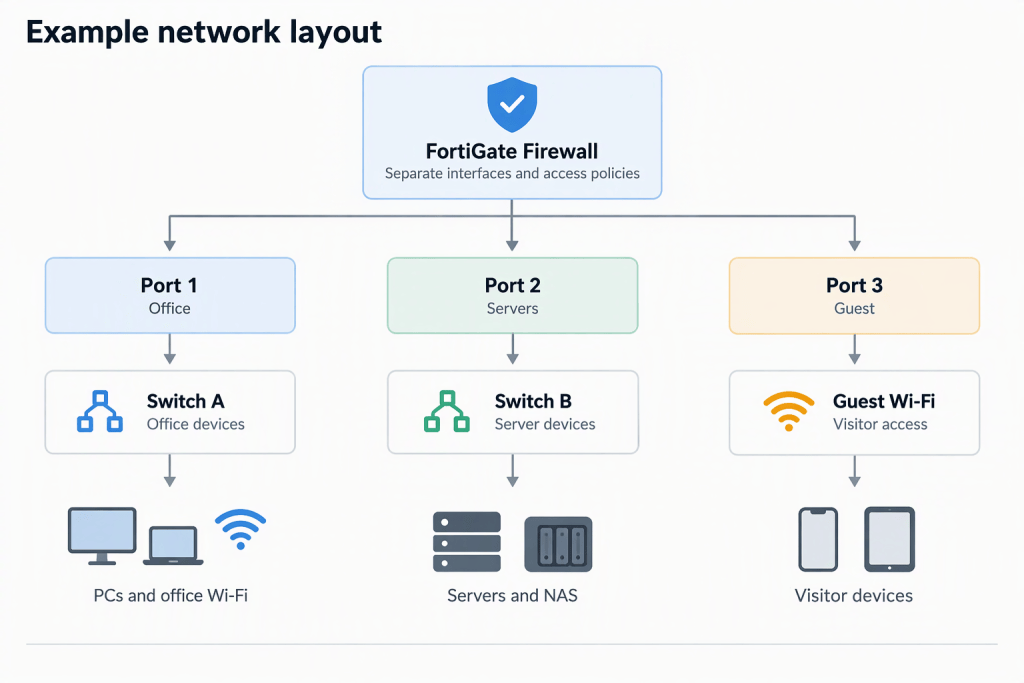
This design keeps the physical network straightforward. Each switch serves a specific group of devices, while the FortiGate firewall manages communication between the different network segments.
For suitable environments, we can also use VLANs over managed switches and access points rather than requiring a dedicated physical firewall port and switch for every segment.
Firewall Policies Between Network Segments
Creating separate networks is only part of the implementation. The firewall must also control which traffic is allowed between them.
We configure access policies based on business requirements.
For example:
| Traffic direction | Recommended access |
|---|---|
| Office PCs → Internet | Allow |
| Office PCs → Approved server services | Allow |
| Office PCs → Unnecessary server management ports | Block |
| Servers → Internet | Allow only required services |
| Guest Wi-Fi → Internet | Allow |
| Guest Wi-Fi → Office Network | Block |
| Guest Wi-Fi → Server Network | Block |
| Unauthorised network-to-network traffic | Block |
The exact rules depend on the company’s applications and operational requirements. We avoid unnecessarily blocking services that employees need to perform their work.
5. Benefits of Topone’s Secure Network Segmentation
Our approach is designed to give SMEs meaningful security improvements without the cost and complexity of an unnecessarily complicated network.
Better ransomware containment
Separating employee computers from important servers helps limit unnecessary network access and reduces opportunities for attackers to move laterally.
Better protection for business data
Servers and NAS devices can be placed behind more restrictive firewall policies, reducing their exposure to ordinary office devices and guest connections.
Safer guest Wi-Fi
Visitors can use the internet without being granted access to internal company resources.
Clearer network access control
Different groups of devices receive different access permissions based on their purpose and business requirements.
Straightforward network management
A simple three-segment design is easier to understand, document and maintain than a large collection of unnecessary network segments.
Room for future expansion
Businesses can add further separation later if required, such as isolating CCTV cameras, IP phones, access control systems or other specialised devices.
6. Secure Your Business Network with Topone
A business network does not need dozens of VLANs to become more secure.
For many SMEs, separating office computers, servers and guest Wi-Fi is a practical first step towards reducing network security risks.
Topone provides Fortinet firewall configuration, network segmentation and ongoing IT support for businesses in Hong Kong.
We help assess your existing network, identify which devices should be separated, configure the firewall access policies and ensure employees can continue using the business applications they need.
Improve your network security with a practical design that protects important business systems without making your network unnecessarily complicated.
Contact Topone to discuss secure network segmentation for your business.